Anonymizer
The Anonymizer detects sensitive data in a text (names, addresses, emails, phone numbers, secrets and more) and replaces it with placeholders. You choose which categories to detect, how confident the detection must be, and the label used to build each placeholder.
How It Works
The Anonymizer sends your text to a detection vendor, which finds every piece of sensitive data and gives each one a confidence score between 0 and 1. Serenity* Star then:
- Discards any detection whose score is below the threshold of its category.
- Assigns each remaining value a numbered key, built from the category's replacement label (for example
PRIVATE_PERSON-1,PRIVATE_PERSON-2). The same value always gets the same key, so repeated mentions stay consistent. - Replaces each value in the text with its placeholder, for example
<PRIVATE_PERSON-1>.
The result is a text that is safe to store, share or send to other systems, plus the list of detected entities.
Example
Input:
John Doe lives at 12 Oak Street, Madrid. Email [email protected] or call John Doe at +34 600 111 222.
Output:
<PRIVATE_PERSON-1> lives at <PRIVATE_ADDRESS-1>. Email <PRIVATE_EMAIL-1> or call <PRIVATE_PERSON-1> at <PRIVATE_PHONE-1>.
Getting Started
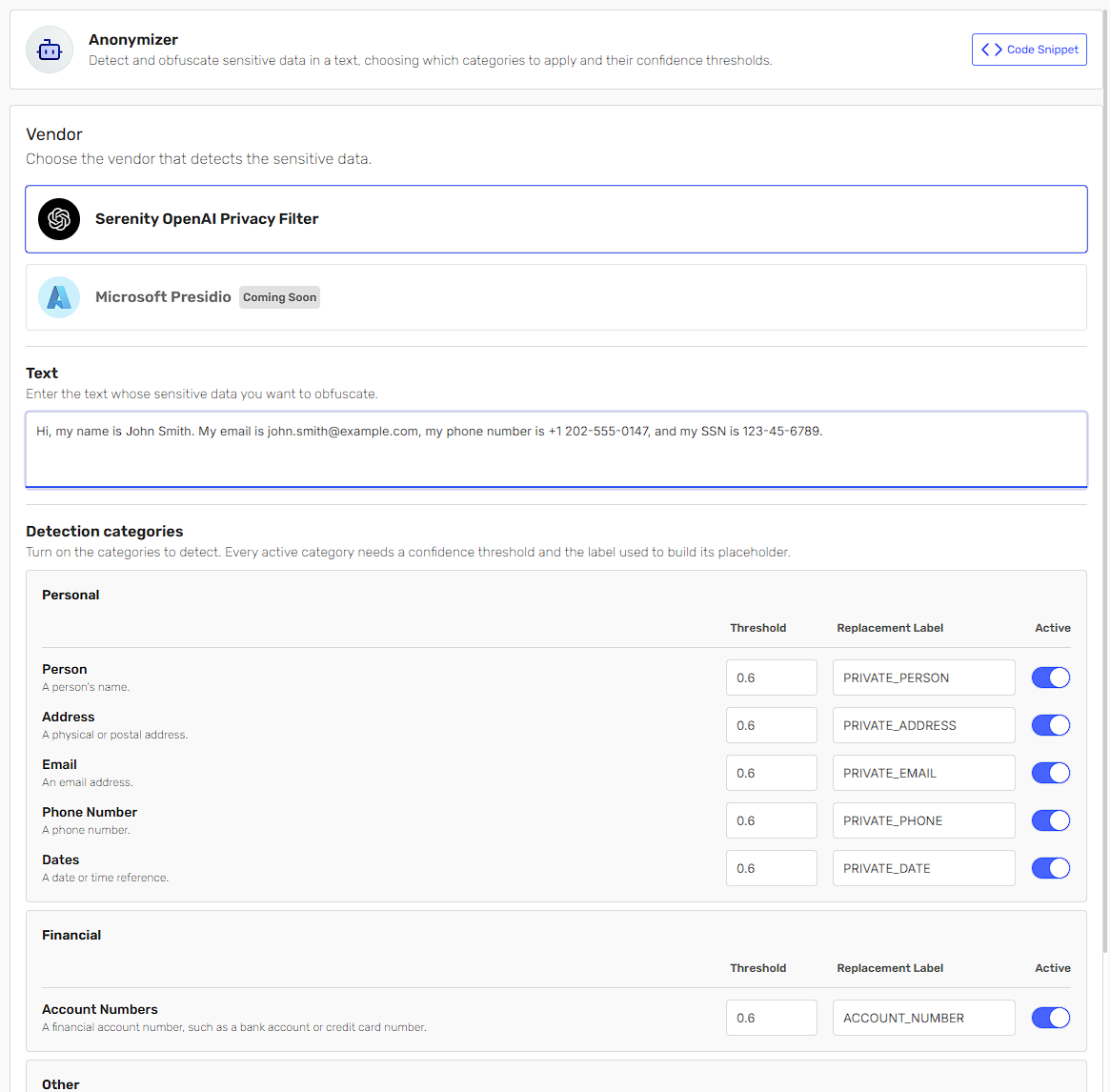
- Navigate to AI Services > Anonymizer in Serenity* Star (under Content Safety Services).
- In Vendor, choose the vendor that detects the sensitive data. For now, only "Serenity OpenAI Privacy Filter" is available (more vendors coming soon).
- In Text, write or paste the text to obfuscate.
- In Detection categories, turn on the categories you want to detect and adjust their Threshold and Replacement Label if needed.
- Click Execute to obfuscate the text.
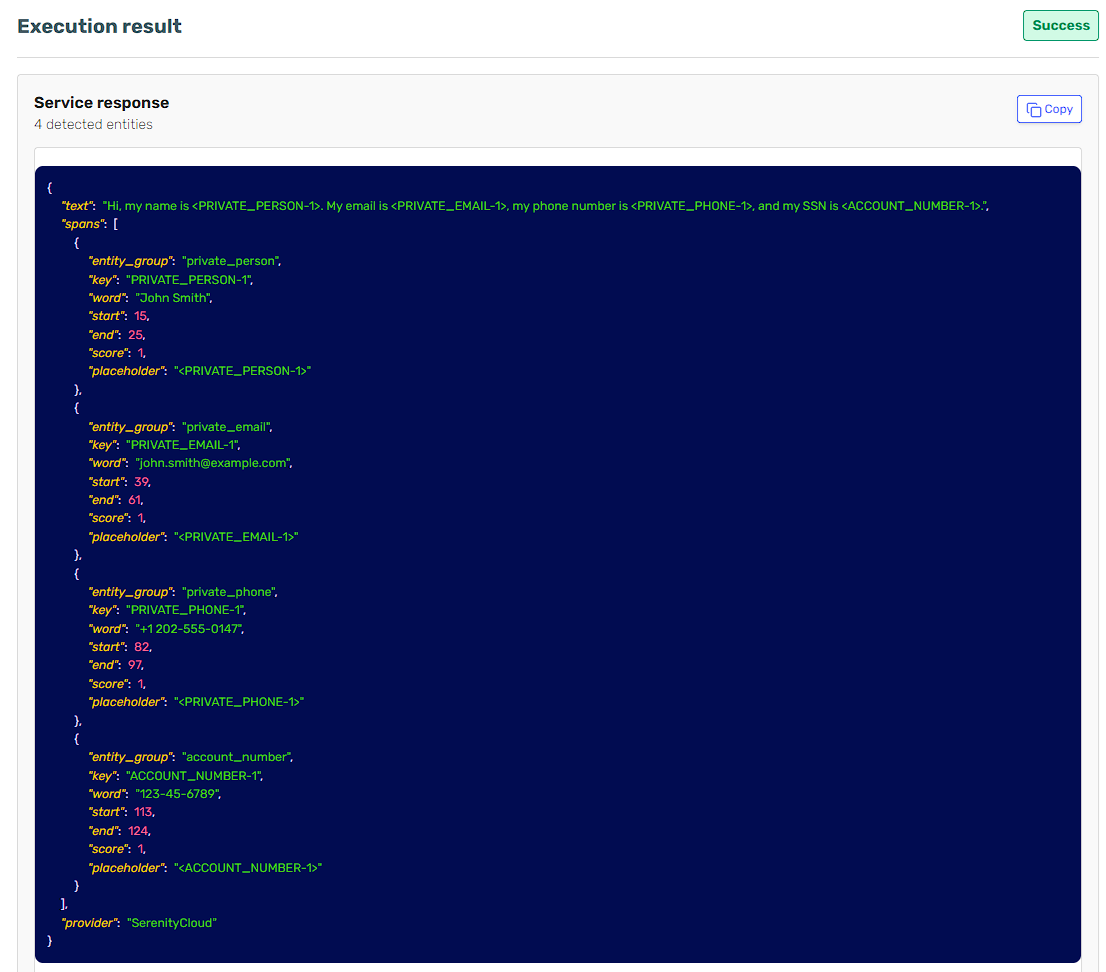
The Execution result panel shows the Service response as JSON, together with the number of detected entities. Use Copy to copy it. The response contains:
text: the obfuscated text.spans: one entry per detected entity, with itsentity_group(category), thekeyassigned to it, the originalword, itsstartandendpositions in the original text, thescore(confidence from 0 to 1) and theplaceholderused in the text.provider: the provider that performed the detection.
Vendors
| Vendor | Status |
|---|---|
| Serenity OpenAI Privacy Filter | Available. A compact model inspired by OpenAI Privacy Filter, hosted natively in Serenity Cloud. |
| Microsoft Presidio | Coming soon. |
Detection Categories
| Group | Category | Code | Detects |
|---|---|---|---|
| Personal | Person | private_person | A person's name. |
| Personal | Address | private_address | A physical or postal address. |
| Personal | private_email | An email address. | |
| Personal | Phone Number | private_phone | A phone number. |
| Personal | Dates | private_date | A date or time reference. |
| Financial | Account Numbers | account_number | A financial account number, such as a bank account or credit card number. |
| Other | Websites | private_url | A website address or URL. |
| Other | Secret | secret | A secret value such as an API key, token, or password. |
Each active category has two settings:
- Threshold: the minimum confidence score (from 0 to 1) a detection needs to be obfuscated. The default is
0.6. Lower values obfuscate more data, at the risk of false positives; higher values obfuscate less data, at the risk of missing some. - Replacement Label: the label used to build the placeholder. By default it is the category code in uppercase (for example
PRIVATE_EMAIL).
If no category is turned on, the service detects every supported category.
Use Cases
The Anonymizer is ideal for:
- Data sharing: Remove personal data from documents, tickets or transcripts before sharing them with third parties.
- Dataset preparation: Clean texts before using them for analytics, evaluation datasets or fine-tuning.
- Logging and storage: Store conversations or support cases without keeping personal data.
- Pre-processing pipelines: Obfuscate text in your own applications before sending it to an external AI model.
API Access
The Anonymizer is available via API through POST /api/v2/Anonymizer/obfuscate. The request accepts:
inputs(required): the text to obfuscate.vendor(optional): defaults toOpenAIPrivacyFilter.categories(optional): the category codes to detect. When omitted, every supported category is detected.categoryOptions(optional): athresholdandkey(replacement label) per category.
The Code Snippet panel in the playground generates a ready-to-use cURL request with the options you have set. See the API documentation for full details.
The response includes the original values of every detected entity (in spans[].word) so that you can map placeholders back to the real data. Treat the full response as sensitive data and only store or share the obfuscated text.
Anonymizer, Privacy Filter and Agent Obfuscation
- Anonymizer (this service) adds Serenity* Star processing on top of the detection model: vendor choice, per-category thresholds, custom labels and consistent, numbered placeholders.
- Privacy Filter calls the hosted detection model directly, without any extra processing. It also offers a batch method to redact several texts in one request.
- Sensitive Data Obfuscation is an agent setting that obfuscates data automatically before it reaches the AI model and restores the original values in the agent's response. Use it when you want to protect data inside agent conversations rather than obfuscate standalone texts.
The Anonymizer does not restore the original values. If you need the de-obfuscated text later, keep the spans from the response in a secure location.