Image Generation
Quickly generate images directly in Serenity* Star by choosing the model that best fits your needs. Describe the image, select a model, and generate results in seconds.
How It Works
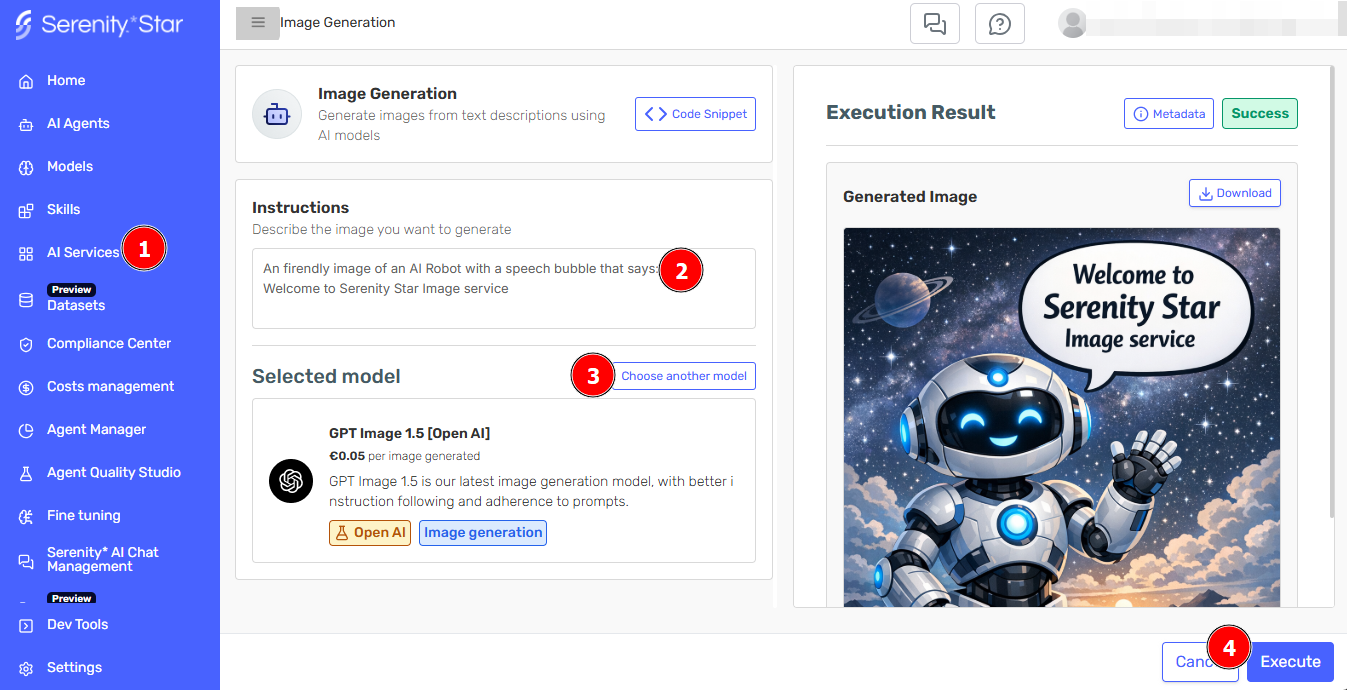
The Image Generation service allows you to create custom images using state-of-the-art AI models. Simply provide a text description of the image you want to create, configure your preferences, and let the AI generate high-quality images for you.
Getting Started
- Navigate to AI Services > Image Generation in Serenity* Star
- Enter a detailed description of the image you want to generate
- Select your preferred AI model from the available options
- Click "Execute" to create your image
Use Cases
Image Generation is perfect for:
- Marketing Materials: Create unique visuals for campaigns and presentations
- Product Mockups: Visualize product concepts before development
- Content Creation: Generate illustrations for blog posts and documentation
- Creative Exploration: Experiment with visual ideas quickly
- Prototyping: Create placeholder images for design projects
Best Practices
To get the best results from Image Generation:
- Be Specific: Provide detailed descriptions including colors, composition, and style
- Iterate: Refine your prompts based on initial results
- Choose the Right Model: Different models excel at different types of images
- Style Guidance: Use style keywords to guide the aesthetic direction
API Access
All Image Generation capabilities are available via the Serenity* Star API. This allows you to:
- Integrate image generation into your applications
- Build custom interfaces for your specific needs
See the API documentation for detailed integration instructions.
For better results, include details about lighting, perspective, and artistic style in your descriptions.