Transcription
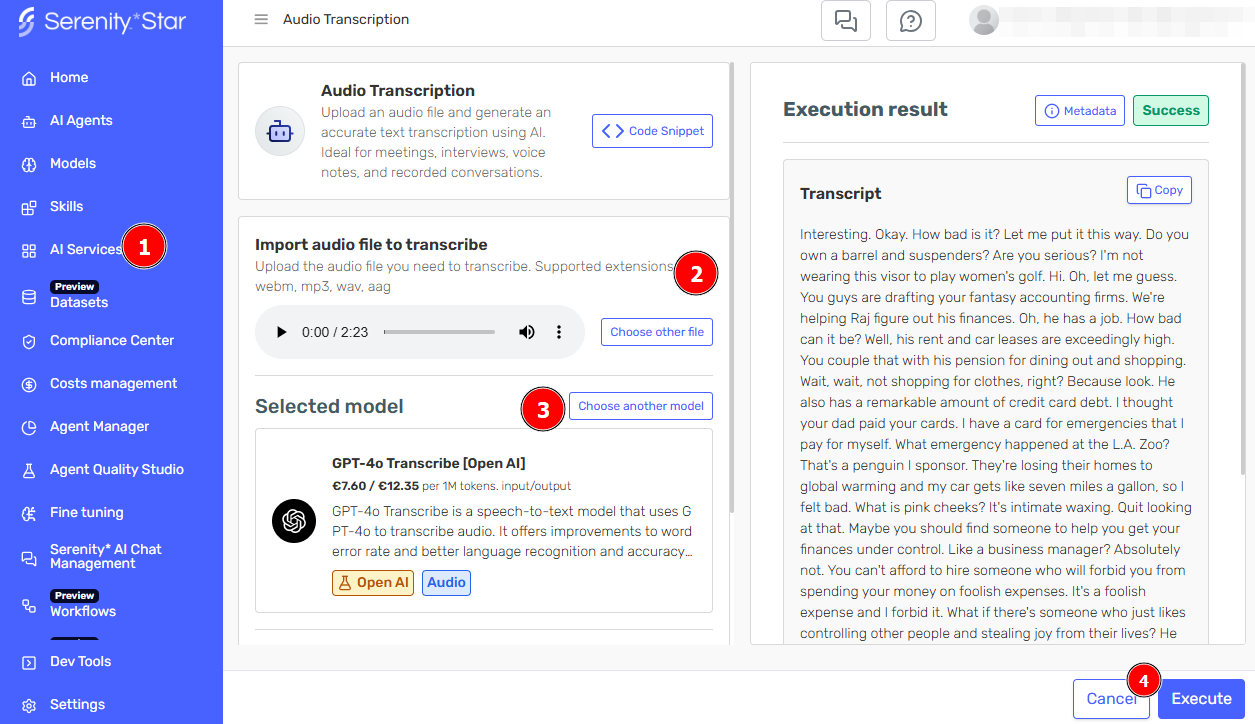
Transcribe audio files directly in Serenity* Star by uploading your audio file and selecting your preferred transcription model. Transcriptions are generated instantly and can be easily copied.
How It Works
The Transcription service converts spoken audio into written text using advanced speech recognition models. Upload your audio files, choose a transcription model, and receive accurate text transcriptions in seconds.
Getting Started
- Navigate to AI Services > Transcription in Serenity* Star
- Upload your audio file (supported formats: MP3, WAV, WEBM, and more)
- Select your preferred transcription model
- Click "Execute" to process your audio
Use Cases
Transcription is ideal for:
- Meeting Recordings: Convert meetings and calls into searchable text
- Podcast Production: Create show notes and transcripts for accessibility
- Research Interviews: Transcribe interviews for analysis
- Content Creation: Generate text from video voiceovers
- Accessibility: Make audio content accessible to all users
- Legal Documentation: Transcribe depositions and proceedings
API Access
Transcription services are available via API for:
- Automated transcription workflows
- Integration with content management systems
See the API documentation for integration details.
tip
For best results, ensure your audio files are clear and free from excessive background noise.