Fallback Model
Introduction
The Fallback Model is a secondary AI model that your agent switches to automatically when the primary model cannot be reached because of a vendor-related issue (an outage, a rate limit, a timeout or an invalid response from the provider). The switch happens during the execution, without any action from the user and without returning an error, so the agent keeps operating even when its main provider is degraded.
This makes it one of the key resilience settings for agents running in production. See the production checklist for the full set of recommendations.
The Fallback Model is a plan-level feature. If your subscription does not include it, the card is shown in read-only mode with an option to upgrade. It is available for Activity, Assistant, Chat Completion and Copilot agents.
How to Use
-
Open the Agent Design Studio and go to the Model section.
-
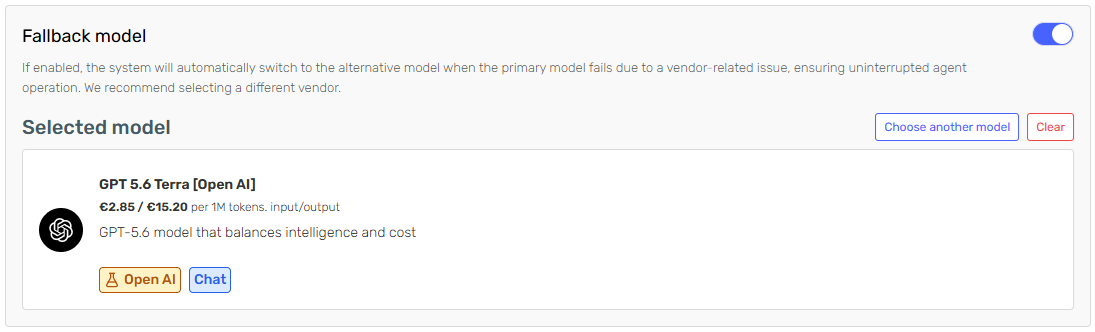
Locate the Fallback model card, below the primary model selection, and turn the switch on.

-
Click the model card to open the model selector and choose the model that should take over. You can clear the selection at any time to pick a different one.
-
Save the agent and publish it so the configuration applies to production executions.
Two validation rules apply when saving:
- If the switch is enabled, a fallback model must be selected.
- The fallback model cannot be the same as the primary model.
How It Works
Every model in Serenity* Star is served through the AI connections available in your tenant, and a model can be served by more than one. When an execution fails because of a vendor issue, the platform first retries the primary model through its remaining connections, and switches to the fallback model only once none of them can serve the request. If the primary model has no connection available when the execution starts, the agent begins directly on the fallback model.
A few behaviours worth knowing:
- Streaming is covered. If the stream breaks mid-response, the retry logic applies in the same way.
- Deterministic errors are not retried. Failures that an alternative model cannot fix, such as exceeding the model's context length, are returned immediately instead of consuming the fallback.
- The agent's parameters are reused. Temperature, token limits and the rest of the model parameters configured on the agent are applied to the fallback model as well. If the fallback model does not support the agent's configured response format, the format is dropped for that execution.
Monitoring Usage
When an execution ends up using the fallback model, a Fallback badge is shown next to the model name in the execution detail, and the model displayed is the fallback one. For conversational agents the badge indicates that the fallback model was used in at least one of the messages of the conversation.
Cost and token consumption are calculated with the pricing of the model that actually answered, so executions served by the fallback model are billed at the fallback model's rates.
Best Practices
- Choose a different vendor. A fallback model from the same provider will usually be affected by the same outage. Picking another vendor is the main reason this feature protects you.
- Choose an equivalent model. The fallback model should be able to handle the same workload: comparable context window, support for skills or tool calling if your agent uses them, and support for JSON responses if your agent defines an output format.
- Test it before you rely on it. Set the fallback model as the primary one temporarily and run your agent against a few representative inputs. This is the only way to confirm that its answers, and their format, meet your expectations before an outage forces the switch.
- Review deprecation warnings. The designer flags deprecation dates for the fallback model as it does for the primary one. A deprecated fallback model is not a safety net.
- Keep an eye on the badge. Recurring Fallback badges in your execution logs are a signal that the primary model or its connections need attention.