Long Term Memory
This feature is currently in preview. Its behaviour and interface may change.
Introduction
By default, every conversation with an agent starts from nothing. You can explain your refund policy to an agent a hundred times and it still will not know it on the hundred-and-first, because each run only sees the current conversation, the agent's instructions, and its Knowledge sources.
Long Term Memory closes that gap. You describe, in plain language, what the agent should remember, and from then on it builds a store of durable facts organised by topic. In later conversations the agent looks those facts up on its own and uses them in its answers.
A memory is not a transcript. Conversations are never archived by this feature: what is kept is the distilled fact, written as a short topic that a person can read, correct or delete.
The two memory levels
Long Term Memory has two independent levels. You can enable either one, or both.
| Level | What it stores | Who benefits |
|---|---|---|
| Agent Memory | Shared knowledge about the agent's domain: business rules, policies, procedures | Every user of the agent |
| User Memory | What the agent knows about one signed-in person: their preferences, role and context | That person only |
Agent Memory is the agent's institutional knowledge. Anything stored there is available to, and visible to, everyone who uses the agent.
User Memory is personal. It is scoped to the signed-in user, so the agent can remember how each person likes to be helped without anyone pasting context into a prompt. Each user reviews and edits their own memories from My Memories.
Memories belong to an agent, and agents belong to a subtenant, so memories are scoped per subtenant.
Requirements
You can give Long Term Memory to Assistant, Copilot, Activity and Chat Completion agents. AI Proxy agents cannot use it, and the card does not appear on them.
To enable this feature, you need administration permission over the agent, and your plan has to include Long Term Memory. Agent Memory comes with the feature itself, while User Memory is part of the Advanced level. If your plan does not cover what you are trying to enable, the card shows an upgrade prompt in place of the toggle, and you can ask for the upgrade from there.
Reading the memories afterwards follows the same rule, with one deliberate exception:
- The agent's shared memories are for whoever administers the agent. If you only have read-only access to an agent, you will not see its Agent Memory tab at all.
- Your personal memories are yours. Any signed-in user opens their own from My Memories, with no permission over the agent required, so even an agent you can no longer use still lets you read and delete what it stored about you.
Enable Agent Memory
For guidance on creating an agent, see this guide.
-
Log in to Serenity* Star.
-
In the left sidebar, click AI Agents, then select the agent you want to configure. The Agent Design Studio opens.
-
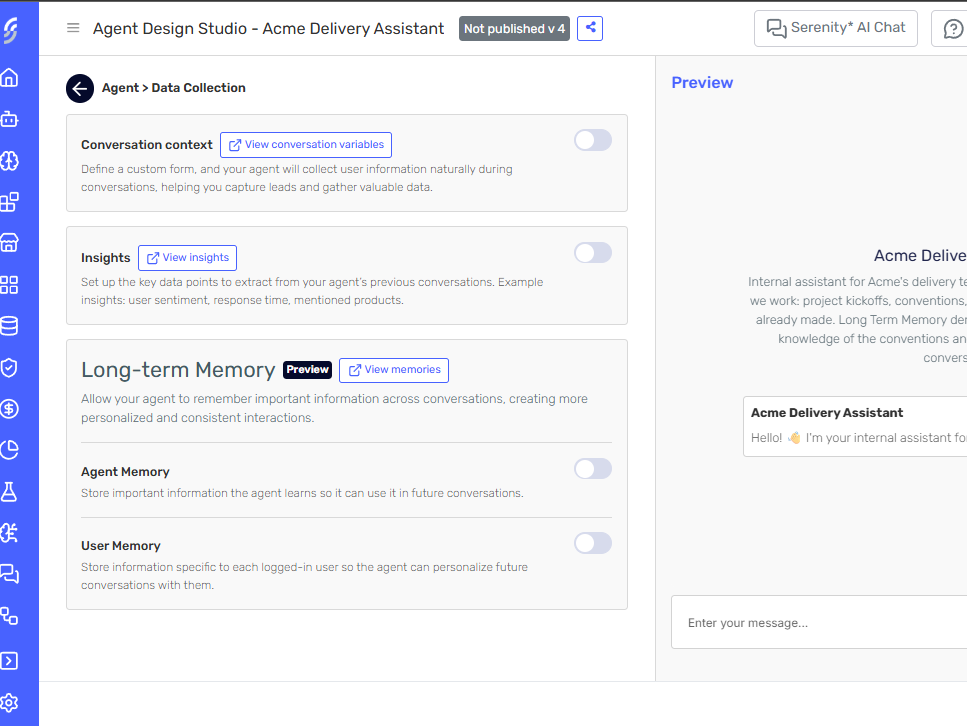
Go to the Data Collection section and find the Long-term Memory card, below Conversation context and Insights.
-
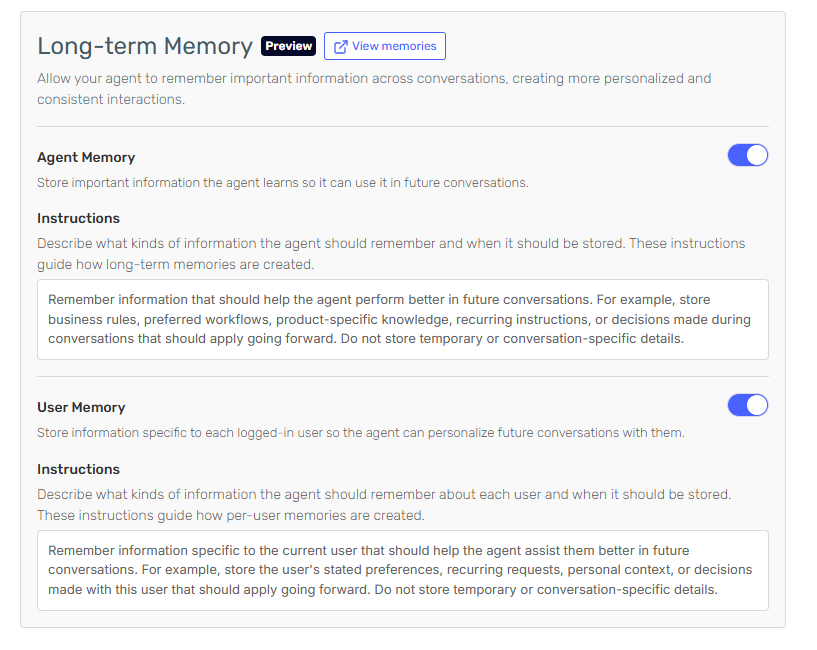
Switch on Agent Memory. An Instructions field appears, pre-filled with a suggested instruction.
-
Edit the instruction to describe what this agent should remember, and when. This is the guidance the agent follows when deciding whether something is worth storing, so be concrete about the kinds of facts you want kept and the kinds you want ignored.
-
Click Save to save the agent.
An instruction is required while the level is switched on, and it cannot exceed 4,000 characters.
"Store product pricing rules, escalation procedures and approved discount limits. Do not store anything about individual customers." gives the agent a clear test to apply. "Remember useful things" does not.
Enable User Memory
-
In the same Long-term Memory card, switch on User Memory. This level requires the Advanced plan. If your plan does not include it, an upgrade prompt appears instead of the toggle.
-
Edit its Instructions field, which is also pre-filled with a suggested instruction. Describe what the agent should remember about each person it talks to.
-
Click Save to save the agent.
Shared memories are visible to every user of the agent. The default instruction tells the agent to keep personal details out of the shared level, but an administrator editing the table by hand can put them in, and everyone using the agent will then see them. Anything about an individual belongs in User Memory.
How memories are collected
Memories reach the store by two routes, and only one of them is immediate.
During a conversation. The agent can read its memories and store a new one on its own initiative, as part of answering. This happens live, inside the conversation.
After conversations close. A background process runs once a day, reads the conversations that closed since its previous run, and turns them into memories. This route does most of the work, so an agent you enable today will normally show its first memories the following day rather than straight away.
What each route is allowed to do differs by level:
| Route | Add | Update | Delete |
|---|---|---|---|
| During a conversation, Agent Memory | ✅ | ⛔ | ⛔ |
| During a conversation, User Memory | ✅ | ✅ | ✅ |
| Daily collection, both levels | ✅ | ✅ | ✅ |
Mid-conversation, the agent can only add to the shared level. If a conversation contradicts a stored shared fact, the agent leaves the existing memory alone rather than rewriting it. The daily collection is what keeps memories from drifting out of date, in both levels.
Because the daily collection can add, update and delete, a memory that someone removed by hand may reappear if later conversations support it again. To stop the agent storing a kind of fact at all, change the Instructions rather than deleting rows.
The daily collection looks back over a bounded window of recently closed conversations, roughly the last two days by default. An agent on which you enable Long Term Memory today can therefore pick up conversations that closed up to two days before you switched it on. On a busy agent, expect the first memories to predate the change.
The daily collection runs as an agent execution, so it is billed the same way any agent execution is. Enabling Long Term Memory on a high-traffic agent has a cost.
What a memory looks like
Each memory is one row:
- Slug — a short, kebab-case topic name, such as
refund-policyorpreferred-language. The slug is the identity of the memory: it names what the memory is about, never what it says. - Summary — a one-line statement of the fact.
- Detail — the full text the agent reads when it uses the memory.
- Created and Updated — when the row first appeared, and when it last changed.
Because the slug is the identity, editing a slug does not rename a memory, it creates a different topic. Two memories cannot share a slug.
Review and edit the agent's memories
Shared memories are inspectable and editable, so you can correct something the agent got wrong instead of waiting for it to work the correction out on its own.
-
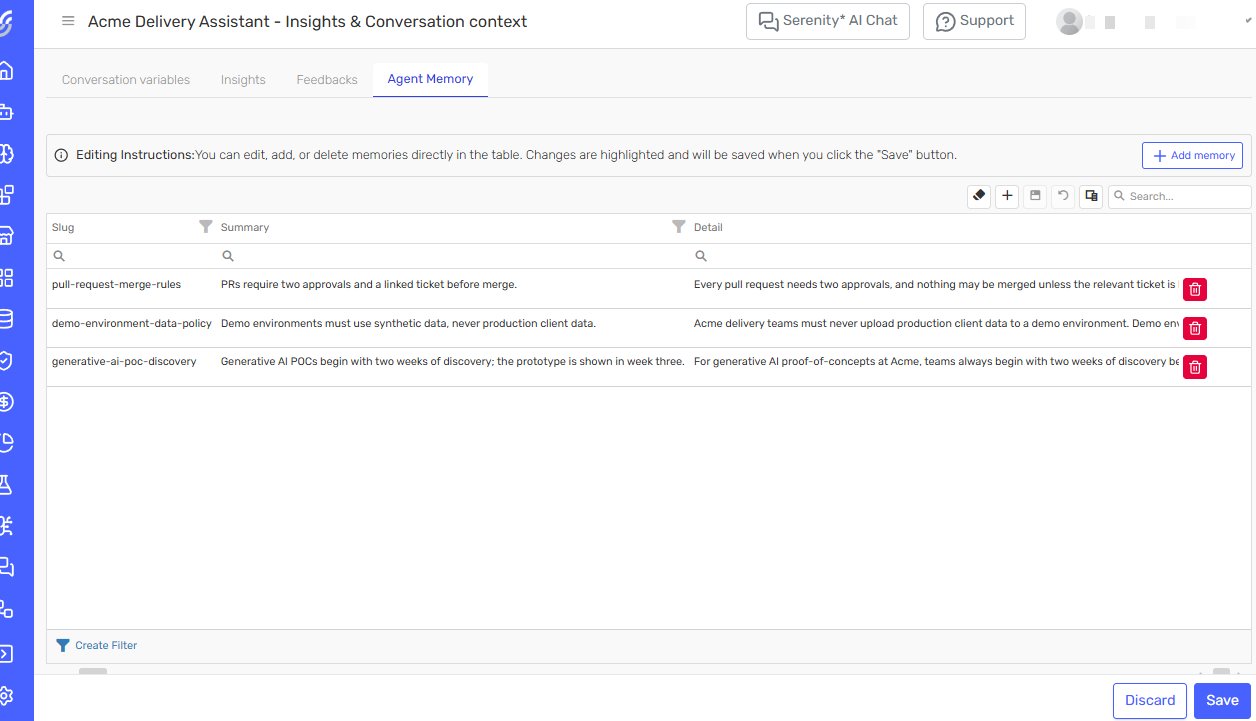
On the Long-term Memory card, click View memories. The Agent Memory tab opens in a new tab. The link appears only once the agent has been saved.
You can also reach it from the agents grid: click the Data Collection button on the agent's card, then open the Agent Memory tab, alongside Conversation variables, Insights and Feedbacks.
-
Read the table. There is one row per topic, identified by its Slug. Use the search box or the column filters to find a memory in a long list.
-
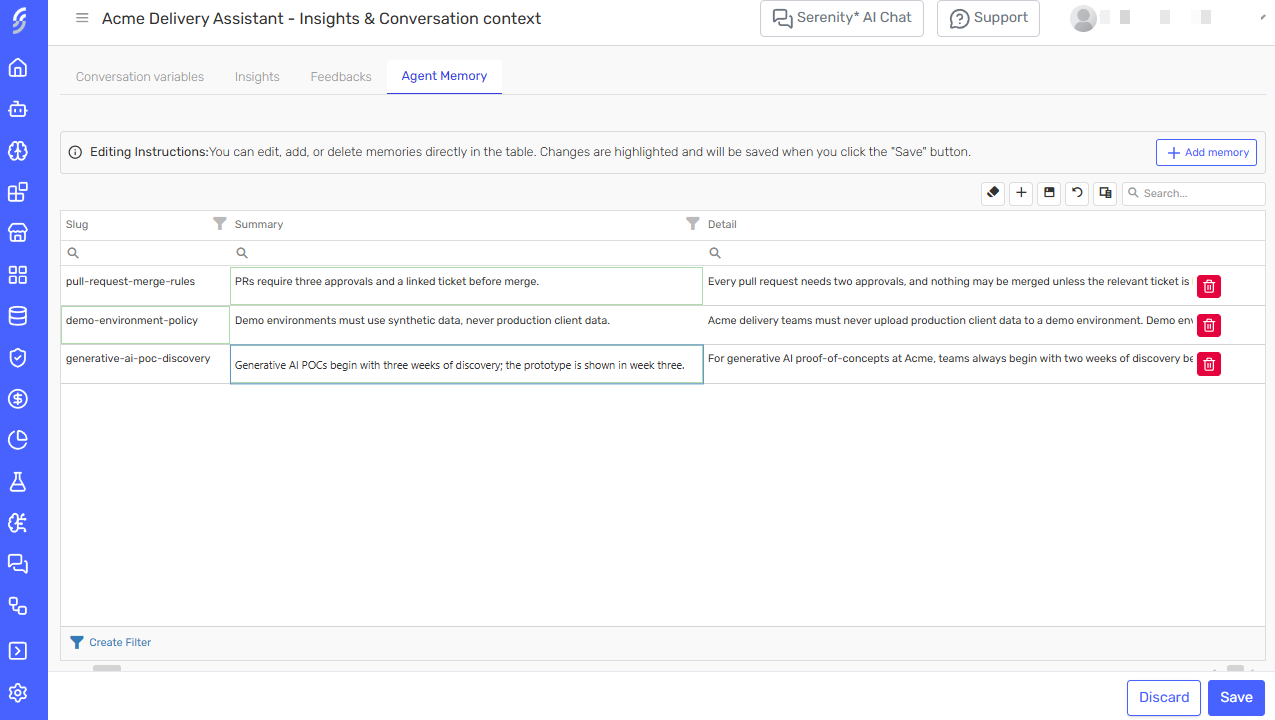
Edit any cell in place, click Add memory to create a row, or use the bin icon at the end of a row to delete it. Changed cells are outlined and nothing is stored yet.
-
Click Save to apply the whole batch, or Discard to drop your changes.
Immediately after you switch memory on the table is empty. Rows appear once conversations close and the daily collection runs, or sooner if the agent chooses to store something mid-conversation. You do not have to wait for that: Add memory lets you write the first memories by hand, which is a quick way to seed an agent with rules it should know from day one.
The whole batch is validated when you click Save. If any row fails, nothing is stored and the table reports the problem. Two checks run at save time rather than while you type: a required cell cannot be left empty, and no two rows may share a slug.
Turning Long Term Memory off
Switching a level off stops the agent reading and writing memories at that level. It is not destructive:
- The Instructions you wrote are kept, ready for the next time you switch the level on.
- Memories already collected are not deleted.
- Users can still open and edit their personal memories for an agent whose User Memory was switched off afterwards.
What Long Term Memory does not do
- No versioning. Unlike Insights and Conversation Context, the memory toggles and their instructions are not versioned with the agent, and memories are not filtered by agent version.
- No activation cut-off. You cannot restrict collection to conversations held after you enabled the feature. See the warning above.
- No export or download of a memory table.
- No administrator view of another user's personal memories. There is deliberately no screen where an administrator reads what an agent knows about a specific person. Each user reviews their own memories in My Memories.
- Not available on AI Proxy agents.
- Not available through the API.
Long Term Memory or Knowledge?
Both give the agent information beyond the current conversation, but they are filled differently.
- Knowledge is curated by you, from documents and websites you upload. Use it when the source of truth already exists as a document.
- Long Term Memory is written by the agent, from its own conversations. Use it for facts that emerge in use and would otherwise be lost when the conversation ends.
They are complementary. An agent can have both.