Privacy Filter
The Privacy Filter gives you direct access to the Serenity OpenAI Privacy Filter, a compact model inspired by OpenAI Privacy Filter with state-of-the-art personal data detection capabilities, hosted natively in Serenity Cloud. Requests and responses go straight to the model, without extra processing.
How It Works
The Privacy Filter analyses a text, detects sensitive data and returns the text with that data redacted, together with the list of detected entities (category, confidence score and position in the text).
Unlike the Anonymizer, the Privacy Filter does not apply confidence thresholds or custom labels, and its placeholders are not numbered (two different names both become [PERSON]). You get the model's raw output, so use it when you want full control over how detections are handled in your own code.
Getting Started
- Navigate to AI Services > Privacy Filter in Serenity* Star (under Content Safety Services).
- In Method, choose the method to call (see Methods). The endpoint bar shows the HTTP verb and URL that will be called.
- In Request body, edit the sample JSON. Use Format to tidy it up. The Info method does not need a body.
- Click Execute to call the service.
The Execution Result panel shows the HTTP status code and the raw JSON Response returned by the model. Use Copy to copy it.
Methods
| Method | HTTP | Description |
|---|---|---|
| Redact | POST | Detect sensitive data and return the text with placeholders. |
| Batch | POST | Redact several texts in one request. |
| Info | GET | Get the deployed model's metadata and supported labels. |
Redact
Analyses a single text and returns it with the detected data redacted. The request accepts:
inputs(required): the text to analyse.placeholders(optional, defaulttrue): whether to replace the detected data with placeholders in the returned text. Set it tofalsewhen you only need the detected spans and will apply your own masking.categories(optional): the categories to detect. When omitted, every supported category is detected.
{
  "inputs": "John Doe lives at 12 Oak Street, Madrid. Email [email protected], phone +34 600 123 456.",
  "placeholders": true,
  "categories": ["private_person", "private_address", "private_email", "private_phone"]
}
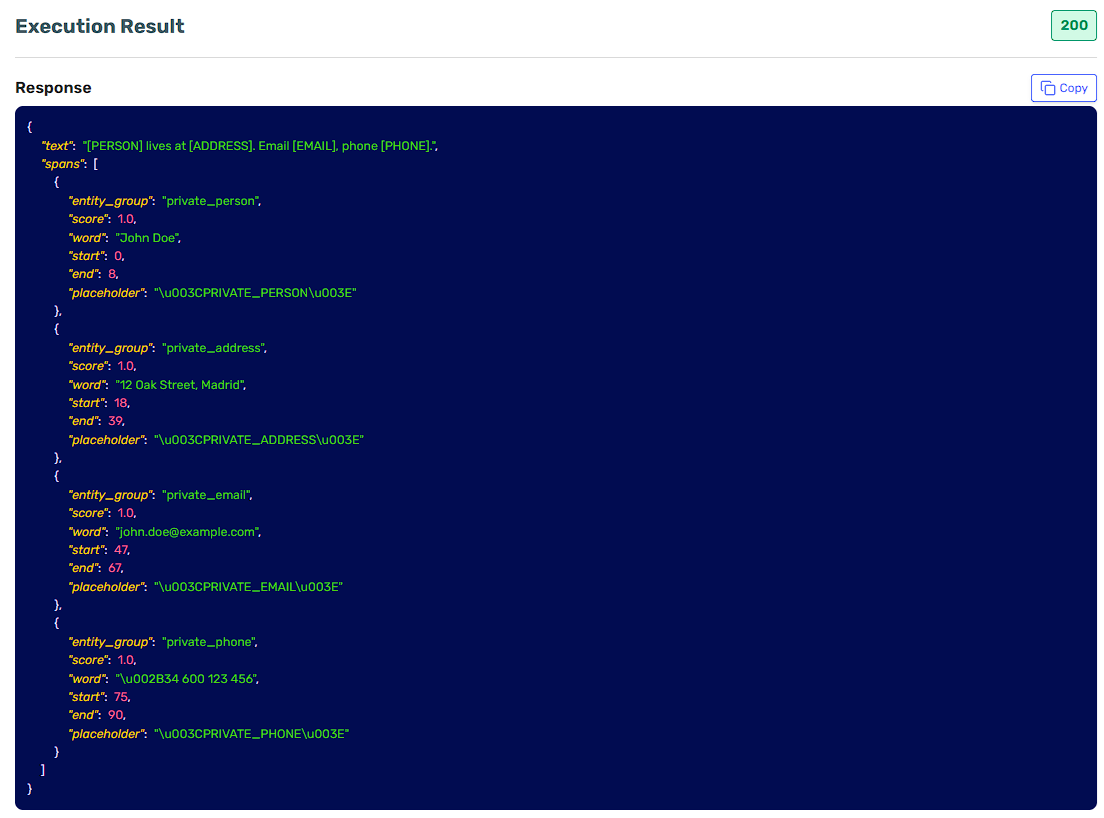
The response contains:
text: the redacted text, for example[PERSON] lives at [ADDRESS]. Email [EMAIL], phone [PHONE].spans: one entry per detected entity, with itsentity_group(category),score(confidence from 0 to 1), the originalword, itsstartandendpositions in the original text, and theplaceholderassociated with it (for example<PRIVATE_PERSON>).
Batch
Redacts several texts in a single request. It accepts the same fields as Redact, but inputs is an array of strings.
{
  "inputs": [
    "John Doe lives at 12 Oak Street, Madrid.",
    "Call Maria at +34 600 111 222 or write to [email protected]."
  ],
  "placeholders": true,
  "categories": ["private_person", "private_address", "private_email", "private_phone"]
}
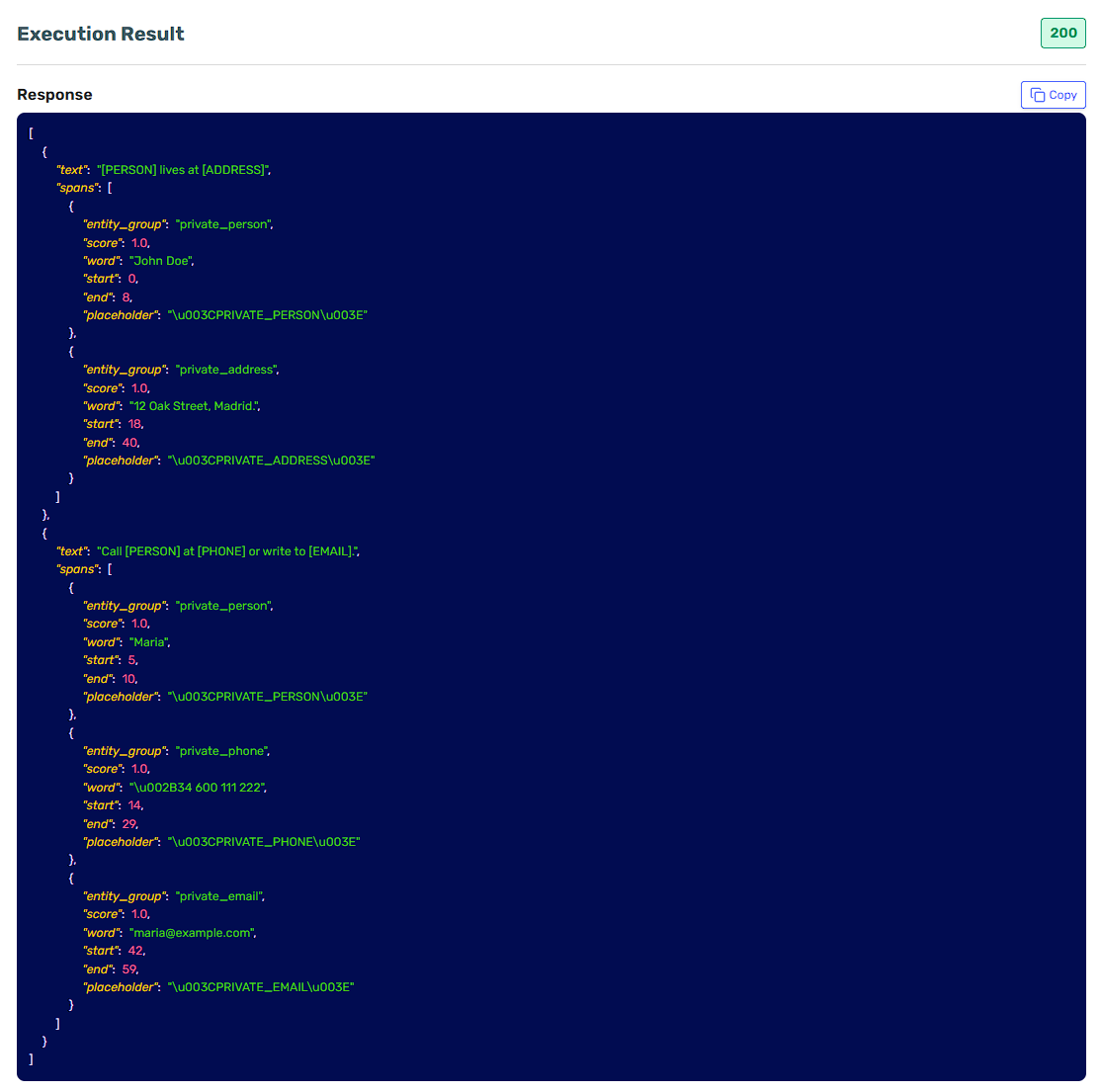
The response is an array with one result per input, in the same order. Each result has the same text and spans structure as a Redact response, and the start and end positions refer to its own input text.
Info
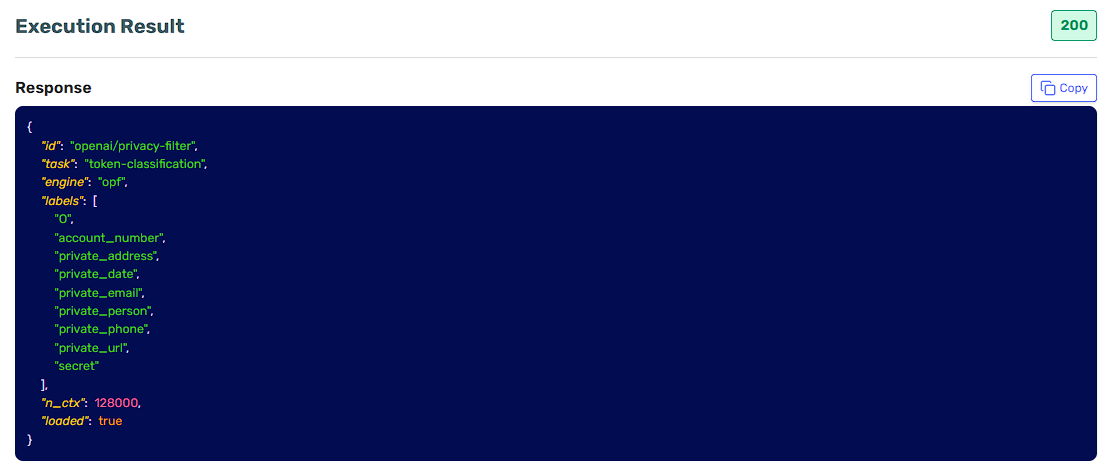
Returns the metadata of the deployed model. This method does not need a request body. The response contains:
id: the model identifier (for exampleopenai/privacy-filter).taskandengine: the type of model and the engine that runs it.labels: the labels the model can return. Besides the supported categories, the list includesO, the label the model uses internally for text that is not sensitive.n_ctx: the model's context size.loaded: whether the model is loaded and ready to receive requests.
Supported Categories
private_person, private_address, private_email, private_phone, private_date, account_number, private_url and secret. See Detection Categories for a description of each one, or call the Info method to get the list from the model.
Use Cases
The Privacy Filter is ideal for:
- Custom pipelines: Apply your own rules to the raw detections (for example, your own thresholds or masking format).
- Bulk processing: Redact many texts in a single call with the Batch method.
- Detection and routing: Use the detected spans to flag, review or route content that contains sensitive data.
API Access
The Privacy Filter is available via API at /api/v2/privacyfilter/{method}, where {method} is redact, batch or info. The Code Snippet panel in the playground generates a request that mirrors the method and body you have set. See the API documentation for details:
- Redact sensitive data from a text
- Redact sensitive data from several texts
- Get Privacy Filter model metadata
The response includes the original values of every detected entity (in spans[].word). Treat the full response as sensitive data and only store or share the redacted text.
To protect data inside agent conversations automatically, use the agent's Sensitive Data Obfuscation setting and choose Serenity OpenAI Privacy Filter as the provider. The agent obfuscates data before it reaches the AI model and restores the original values in the response.