HTTP Request Bodies & Content Types
The HTTP Request skill can send a body with any method that supports one (POST, PUT, PATCH and DELETE). What you have to write in the configuration depends on two choices:
- The body type — Static Body, Dynamic Body or AI-Generated Body.
- The content type — the media type the target endpoint expects.
This page is the reference for combining the two: what a good body description looks like for each content type, and what the platform sends on the wire.
Body types
A body is only sent when Include request body is enabled. With the switch off, an empty body is sent. When it is on, choose one of three body types:
| Body type | Who writes the payload | Use it when |
|---|---|---|
| Static Body | You. The value is sent exactly as configured, with no model involvement and no Liquid substitution. | The payload never changes. |
| Dynamic Body | Both. You provide the template, and the tokens inside it are resolved from the execution context or by the agent. | You want the structure guaranteed and only some values to vary. This is the safest option for strict APIs. |
| AI-Generated Body | The agent. You provide a description of the payload; the agent returns the whole body on each execution. | The payload depends on the conversation, for example fields extracted from what the user asked for. |
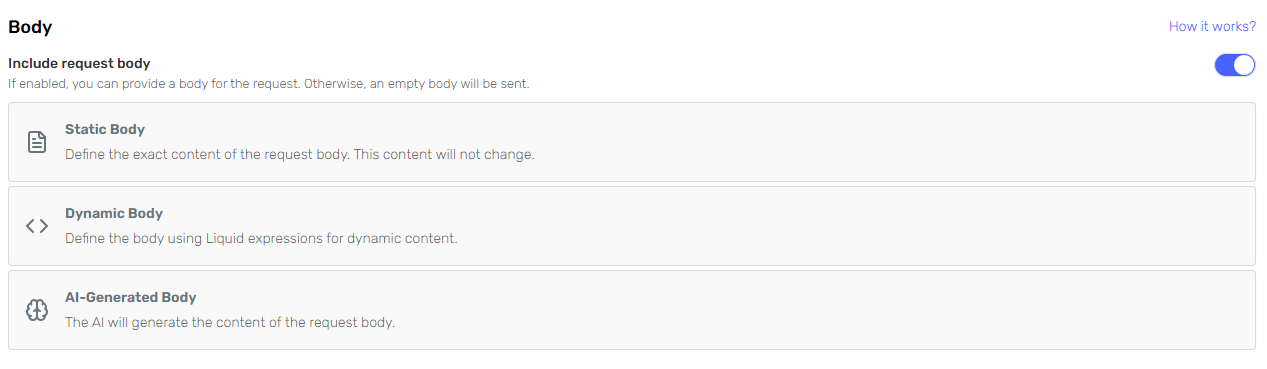
Prefer Dynamic Body whenever you already know the exact shape of the payload. The agent is then only responsible for the individual values, so it cannot invent, rename or omit fields, and the values it does write are escaped for you. Reserve AI-Generated Body for payloads whose shape genuinely varies between executions.
How the tokens of a dynamic body are resolved, and how to write the descriptions the agent follows, is covered in AI-Generated Skill Parameters.
Liquid tokens are resolved in dynamic bodies, in the URL and in header values, but not in a static body: a {{token}} there travels to the endpoint as literal text. If any part of the payload has to vary, use a dynamic body.
Skills configured before body types were introduced report a Legacy body, and the designer offers to migrate them with Choose body type or Use empty body. A legacy skill keeps working: it sends the configured body if there is one, and otherwise lets the agent supply it, treating the body as optional. New configurations should use one of the three types above.
Headers and content type
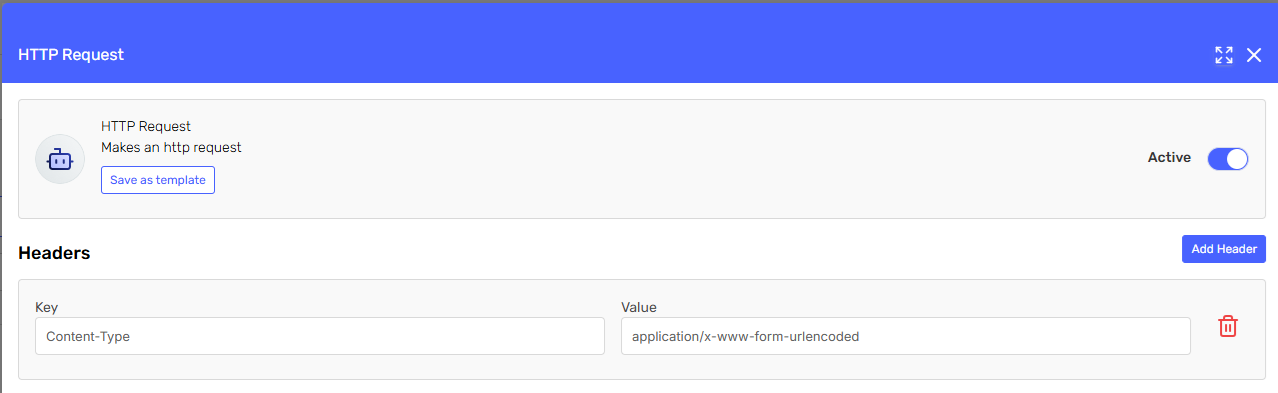
The content type of the request is taken from the Content-Type header you configure on the skill. When you do not set one, the body is sent as application/json, so JSON payloads need no header at all.
Only these content types are accepted, because they are the ones the skill knows how to build content for:
| Content type | What the body must contain |
|---|---|
application/json | A valid JSON document (the default when no header is set) |
application/vnd.api+json | A valid JSON:API document |
application/json-patch+json | A valid JSON Patch document |
application/merge-patch+json | A valid JSON Merge Patch document |
application/ld+json | A valid JSON-LD document |
application/hal+json | A valid HAL+JSON document |
application/xml | An XML document, sent as it is written |
text/plain | Plain text, sent as it is written |
application/x-www-form-urlencoded | URL-encoded key/value pairs (key1=value1&key2=value2), sent as they are written |
multipart/form-data | A valid JSON document, whose properties are turned into form fields before the request is sent |
The header value is matched against that list as an exact, lower-case string. application/json; charset=utf-8, Application/JSON or any other media type is rejected when you save the skill. The charset is added for you: text bodies are always encoded as UTF-8.
Headers are configured with Add Header as key/value pairs. Duplicate keys are allowed where an API requires them, and header values can contain Liquid tokens (keys can too, but keeping them static is far easier to reason about).
The following headers are managed by the platform, or unsafe to override, and are not accepted:
Authorization (use the Authentication section instead), Cache-Control, Connection, Cookie, Forwarded, Pragma, Proxy-Authorization, Proxy-Connection, Set-Cookie, Upgrade, User-Agent, Via, X-Forwarded-For, X-Real-IP, and any header whose name starts with CF.
Two more rules apply to the URL rather than the body: it must use HTTPS, and when its path ends in a file extension, that extension must be one of .txt, .md, .html, .json, .xml, .pdf, .xlsx, .xls, .csv, .jpg, .png, .gif, .webp.
You do not have to explain the format to the agent
For an AI-Generated Body, the platform builds the description of the body argument itself: it states that the whole body must be returned as a single string, adds the format expected for the configured content type (for example "The string must contain a valid JSON document"), and then appends your instructions. So write about what the payload must contain, not about which syntax to emit.
The format line is the one thing you may still have to say yourself: when the Content-Type header value is a Liquid token, its value is unknown at design time, so no format hint can be added. In that case, state the expected format in your description.
JSON (application/json and the other JSON media types)
The default. Describe the payload as a JSON object.
Static Body — the exact JSON to send. It is sent verbatim: Liquid tokens are not resolved in a static body, so use a dynamic body if any part of the payload has to vary.
{
  "source": "serenity-agent",
  "notify": true
}
AI-Generated Body — describe every field, then give one complete example. The agent produces the JSON document on each execution:
Send the task to create, with these fields:
- title (string, required): short summary of the task.
- dueDate (string, optional): ISO-8601 date (YYYY-MM-DD). Resolve relative dates such as
  "next Friday" against today's date. Send null when no deadline is mentioned.
- priority (string, required): one of "low", "medium", "high". Use "medium" when the user
  does not say.
- tags (array of strings, optional): send an empty array when there are none.

Example:
{ "title": "Renew the SSL certificate", "dueDate": "2026-03-14", "priority": "high", "tags": ["infra"] }
Dynamic Body — provide the template and let the tokens be resolved. Keep the quotes that JSON requires around string values:
{
  "title": "{{title}}",
  "dueDate": "{{dueDate}}",
  "priority": "{{priority}}",
  "customerId": "{{customerId}}"
}
String values are JSON-escaped as they are substituted, so a value containing quotes, backslashes or line breaks cannot break the document.
For every JSON media type the body is parsed before the request goes out. An invalid document is reported as a configuration error for a Static or Dynamic body, and as an argument error for an AI-Generated one, which the agent sees and can correct on a new attempt.
A Dynamic Body is the most reliable option for JSON APIs with a fixed contract: the field names, nesting and types come from your template, and the agent only fills in the values.
text/plain
Add a Content-Type: text/plain header. The body is sent as raw text, exactly as produced and with no validation, so do not describe it as JSON.
AI-Generated Body — say what the text must contain and how it must be formatted:
One line per incident, formatted as:
severity|component|one-sentence summary
Severity is one of P1, P2 or P3. Do not add a header line and do not use markdown.

Example:
P2|checkout-api|Checkout returns 500 for guest users since 14:20 UTC.
Dynamic Body — a text template with tokens works the same way:
{{severity}}|{{component}}|{{summary}}
application/xml
Add a Content-Type: application/xml header. As with plain text, the body is sent as raw XML and is not validated by the platform.
Because XML is easy to get subtly wrong, prefer a Dynamic Body with a fixed document and tokens for the values:
<ticket>
  <subject>{{subject}}</subject>
  <priority>{{priority}}</priority>
  <requester>{{requesterEmail}}</requester>
</ticket>
If the document shape really does vary, use an AI-Generated Body and include a complete example document in the description, saying whether the API needs an XML declaration.
application/x-www-form-urlencoded
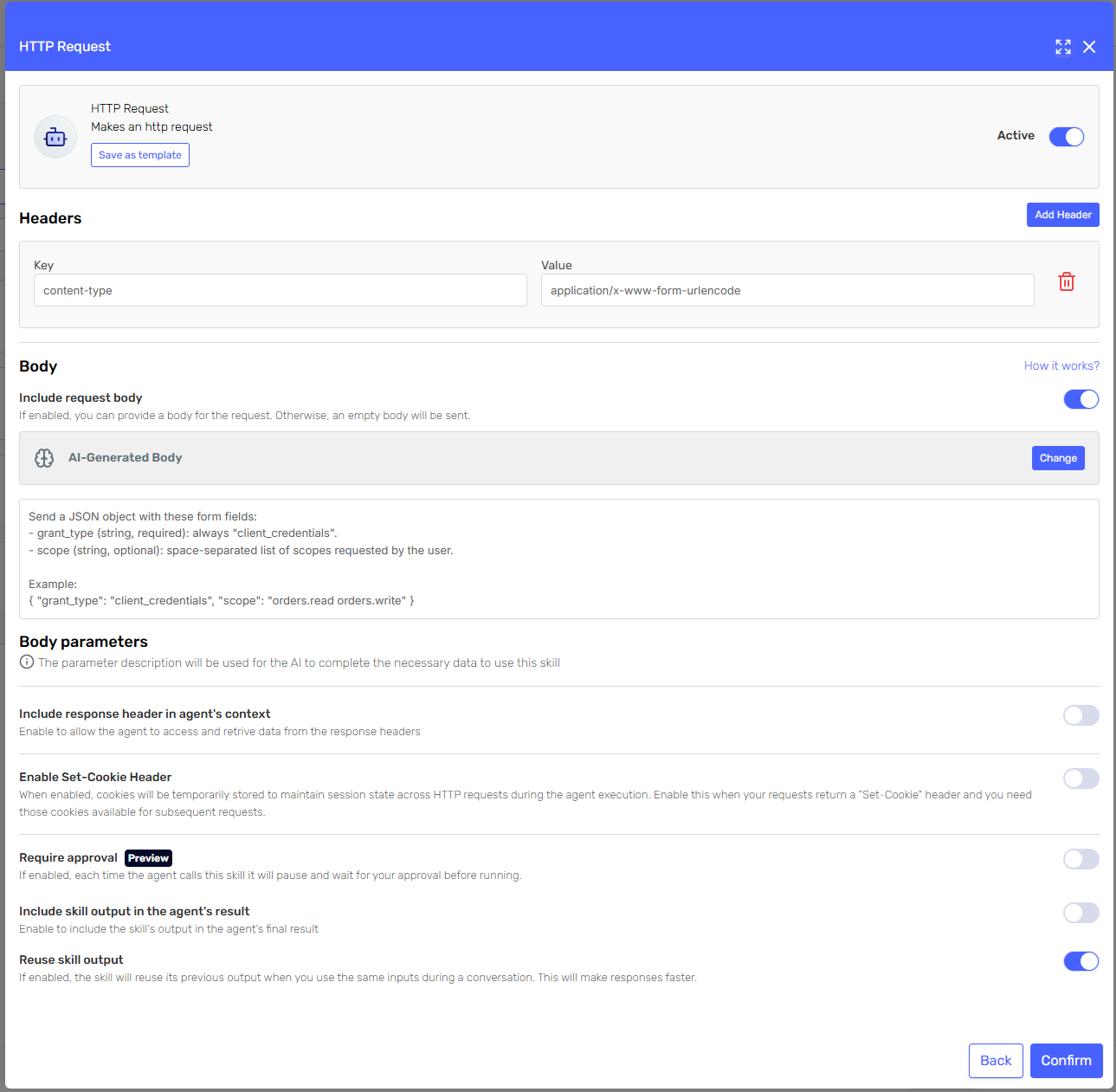
Add a Content-Type: application/x-www-form-urlencoded header.
The body is sent verbatim, so it must already be the encoded pair string. There is no JSON-to-form conversion for this content type: a JSON object would travel as raw JSON and the endpoint would reject it.
AI-Generated Body — describe the fields and show the encoded shape. The platform already tells the agent that the string must contain URL-encoded key/value pairs, so your job is to list the fields and their values:
Send these form fields:
- grant_type: always "client_credentials".
- scope (optional): the scopes the user asked for, separated by a plus sign.

Percent-encode any character that is not alphanumeric.

Example:
grant_type=client_credentials&scope=orders.read+orders.write
Static Body or Dynamic Body — paste the encoded pairs exactly as the API expects them:
grant_type=client_credentials&scope={{scope}}&customer={{customerId}}
Notes:
- There is no nesting. Form encoding has no standard representation for objects or arrays; flatten them into individual fields (
address.city,tags[0]) if the API expects that convention. - Values must be percent-encoded by whoever writes the string, including in a dynamic template: a value with a space,
&or=will otherwise corrupt the pairs.
multipart/form-data
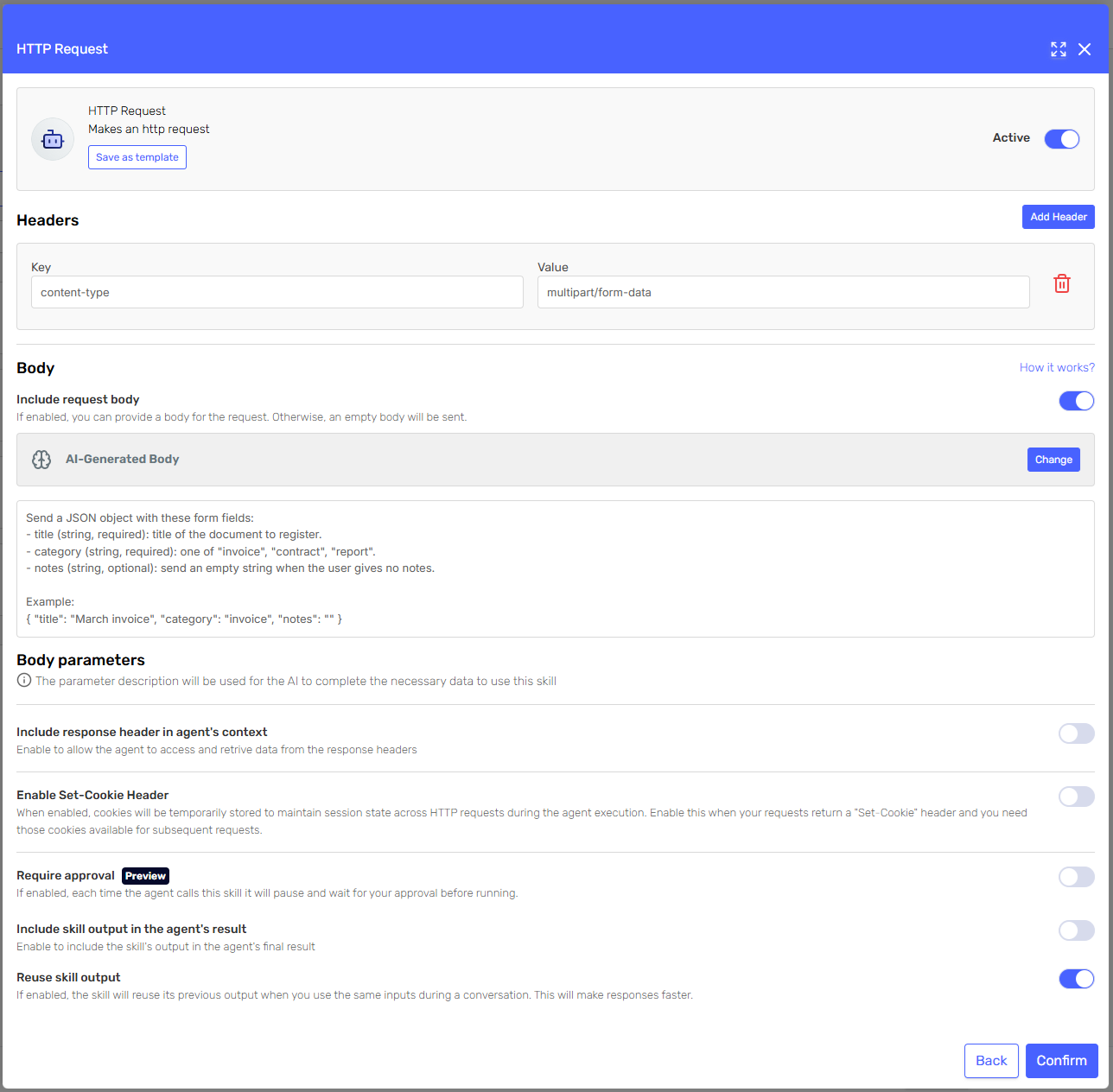
Add a Content-Type: multipart/form-data header. Put only the media type there: the delimiter that separates the parts of the body (the boundary) is generated and appended for you, and a hand-written one would not match the body that is actually sent.
This is the one content type built from a JSON document: describe the body as JSON, and each property becomes one form field.
Send the document to register, with these fields:
- title (string, required): title of the document.
- category (string, required): one of "invoice", "contract", "report".
- notes (string, optional): send an empty string when the user gives no notes.

Example:
{ "title": "March invoice", "category": "invoice", "notes": "" }
The example above is sent as three form fields, title, category and notes.
Notes:
- Field names come from the JSON keys, so they must match what the endpoint expects, casing included.
- Nesting is flattened for you. A nested object becomes a dotted field name and an array becomes an indexed one:
{"customer":{"id":"12"},"tags":["infra"]}is sent as the fieldscustomer.idandtags[0]. Only use nesting when your endpoint actually reads those names. - Values are stringified: numbers and booleans are sent as their literal text, and
nullbecomes an empty field. - The JSON must parse. An invalid document is rejected before the request is sent (a trailing comma is tolerated).
- File uploads are not built this way; the fields are text parts.
Checklist before saving the skill
- The
Content-Typeheader is one of the accepted values, in lower case and with no extra parameters (or absent, for JSON). - The body description says what the payload must contain, and includes one complete example in the shape that content type expects.
- Optional fields are marked as optional, with an explicit instruction for the "unknown value" case.
- Anything that must never change lives in a Static or Dynamic body, not in a description. Remember that a static body gets no Liquid substitution.
- The skill description explains when the agent should call the endpoint, not just what the payload looks like.
- The agent's system definition provides the context the parameters need (today's date, current user, tenant, language).
Related pages
- AI-Generated Skill Parameters — body types, parameter definitions and how values are resolved.
- Input Parameter Mapping — sending exact values from the execution request into a skill.
- A Guide to Executing POST Requests with Serenity* Agents — iterating on a skill description until the agent calls the right endpoint.
- Building request bodies with AI-generated skill parameters — a worked example across content types.