Building request bodies with AI-generated skill parameters

The HTTP Request skill lets an agent call your APIs, and most of the work of getting it right is in the request body. Serenity* Star gives you three ways to build one: a static body you write yourself, an AI-Generated body the agent writes from your description, and a dynamic body where you own the template and the agent only fills in the values.
This article works through all three on a small task-tracker API, and then shows how the same ideas apply to URL-encoded, multipart and plain-text endpoints.
For the reference documentation, see AI-Generated Skill Parameters and HTTP Request Bodies & Content Types.
The example API
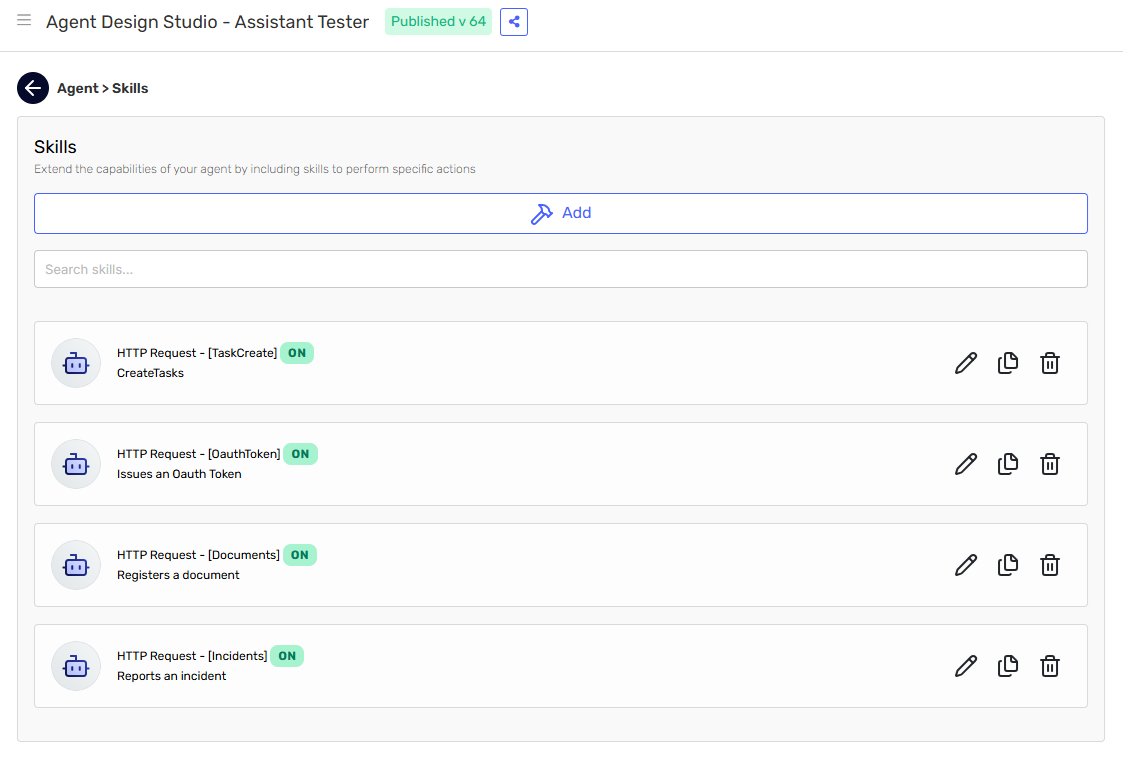
Our mock task tracker exposes four endpoints, and the agent has one HTTP Request skill for each. We will refer to them by their skill names throughout the article:
| Skill | Endpoint | Content type |
|---|---|---|
| TaskCreate | POST /tasks (creates a task) | application/json |
| OauthToken | POST /oauth/token (issues a token) | application/x-www-form-urlencoded |
| Documents | POST /documents (registers a document) | multipart/form-data |
| Incidents | POST /incidents (reports an incident) | text/plain |
The agent is an Assistant that helps a support team log work while they chat with a customer.
Iteration 1: an AI-generated body with a thin description
We start with TaskCreate, the JSON endpoint. In its skill configuration we enable Include request body, choose AI-Generated Body, and describe the payload the way most of us do the first time:
A JSON object with the task to create. Example:
{ "title": "Renew the SSL certificate", "dueDate": "2026-03-14", "priority": "high" }
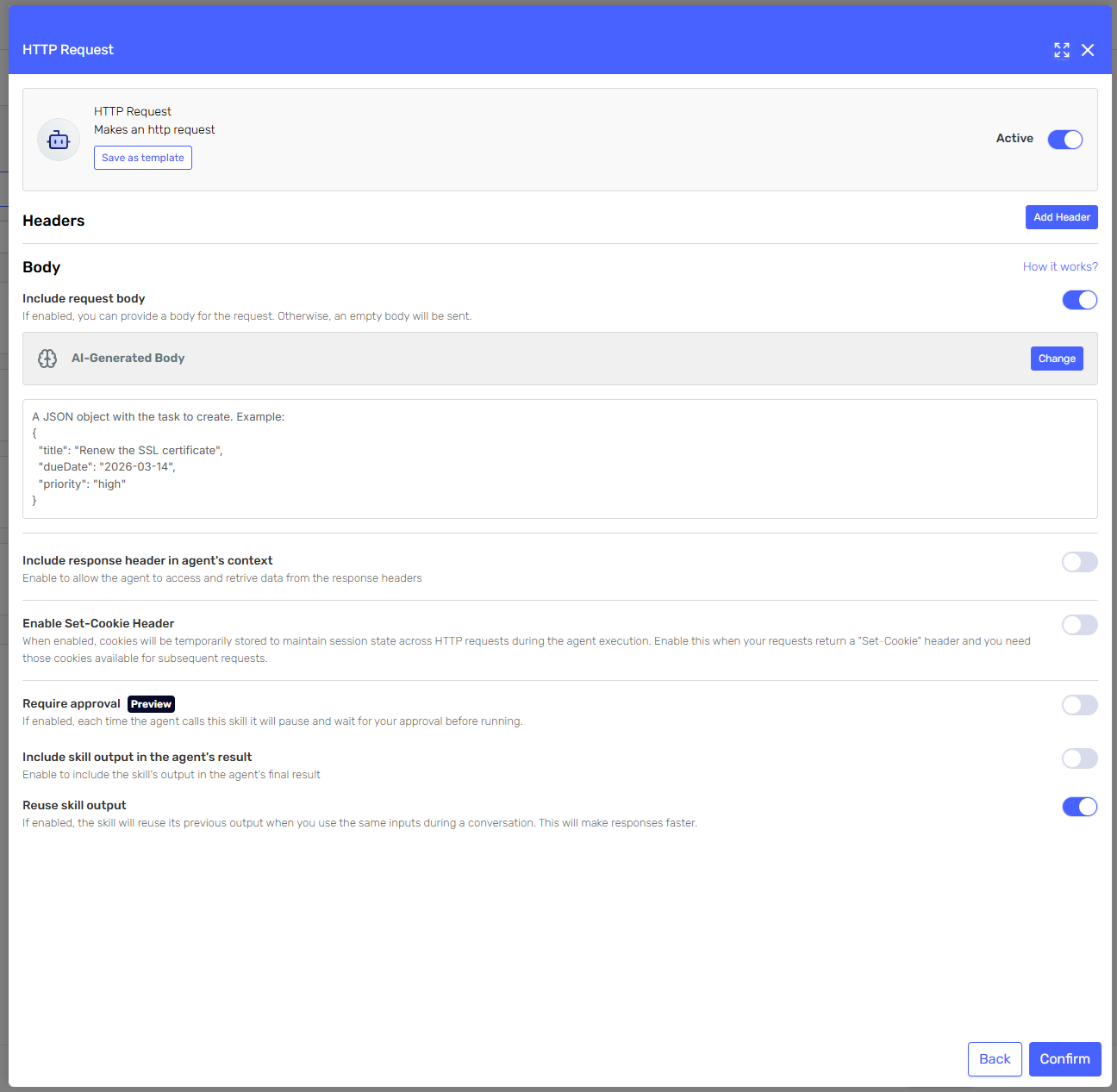
Testing it with "Log a task to chase the invoice for ACME, it is urgent" produces two problems worth noticing:
- The agent sends
"dueDate": "2026-03-14", the date from our example, even though the user never mentioned a deadline. - It sends
"priority": "urgent", which our API rejects, because nothing in the description says which values are valid.
Both are the same mistake on our side: the description shows a payload but does not explain it. An example tells the model what the JSON looks like; it does not tell it what the fields mean.
Iteration 2: describe the fields, not just the shape
Send a JSON object with the task to create:
- title (string, required): short summary of the task, in the customer's language.
- dueDate (string, optional): ISO-8601 date (YYYY-MM-DD). Resolve relative dates such as
  "next Friday" against today's date. Send null when the user mentions no deadline.
- priority (string, required): one of "low", "medium", "high". Map wording such as
  "urgent" or "ASAP" to "high". Use "medium" when the user does not say.
- tags (array of strings, optional): send an empty array when there are none.

Example:
{ "title": "Chase the ACME invoice", "dueDate": null, "priority": "high", "tags": ["billing"] }
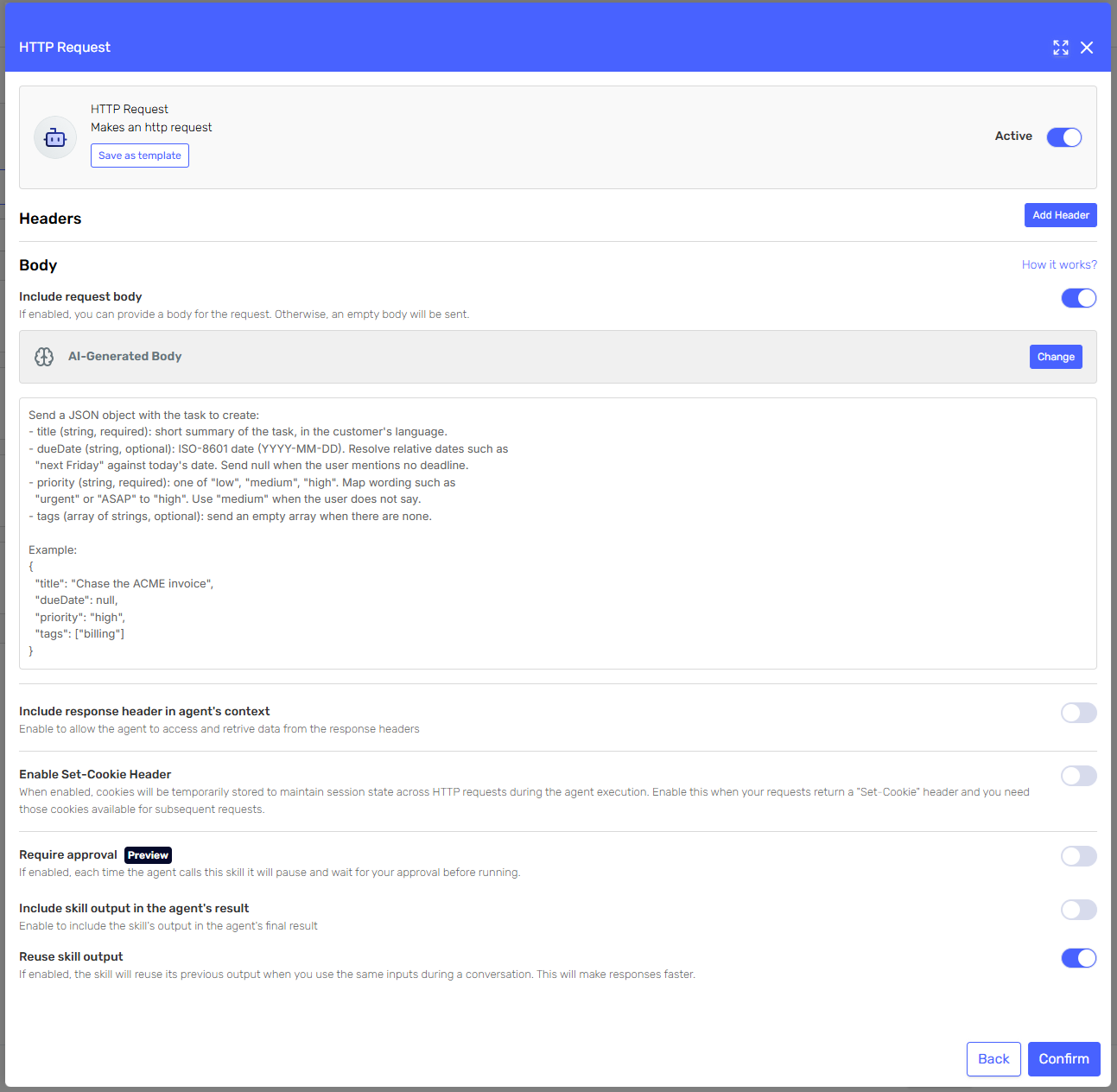
Three things changed:
- Every field states its type, whether it is required, and what to do when the value is unknown.
- The enumeration is listed, with a hint for mapping natural language onto it.
- The example now shows the empty cases (
null,[]) rather than a full payload that invites copying.
The agent also needs to know today's date to resolve "next Friday". That belongs in the system definition, not in the body description:
Today is {{system.date}}. Use it whenever you have to resolve a relative date.
{{system.date}} is a system context property: the platform resolves it at execution time, so nobody has to send it. The same mechanism exposes {{system.country}}, {{system.channel}}, {{system.userIdentifier}} and a few others. Keep agent input parameters for the values the platform cannot know, the way customerId does further down: that is input parameter mapping, and it is the right tool whenever the caller already knows the value.
Iteration 3: a dynamic body, so the shape can no longer drift
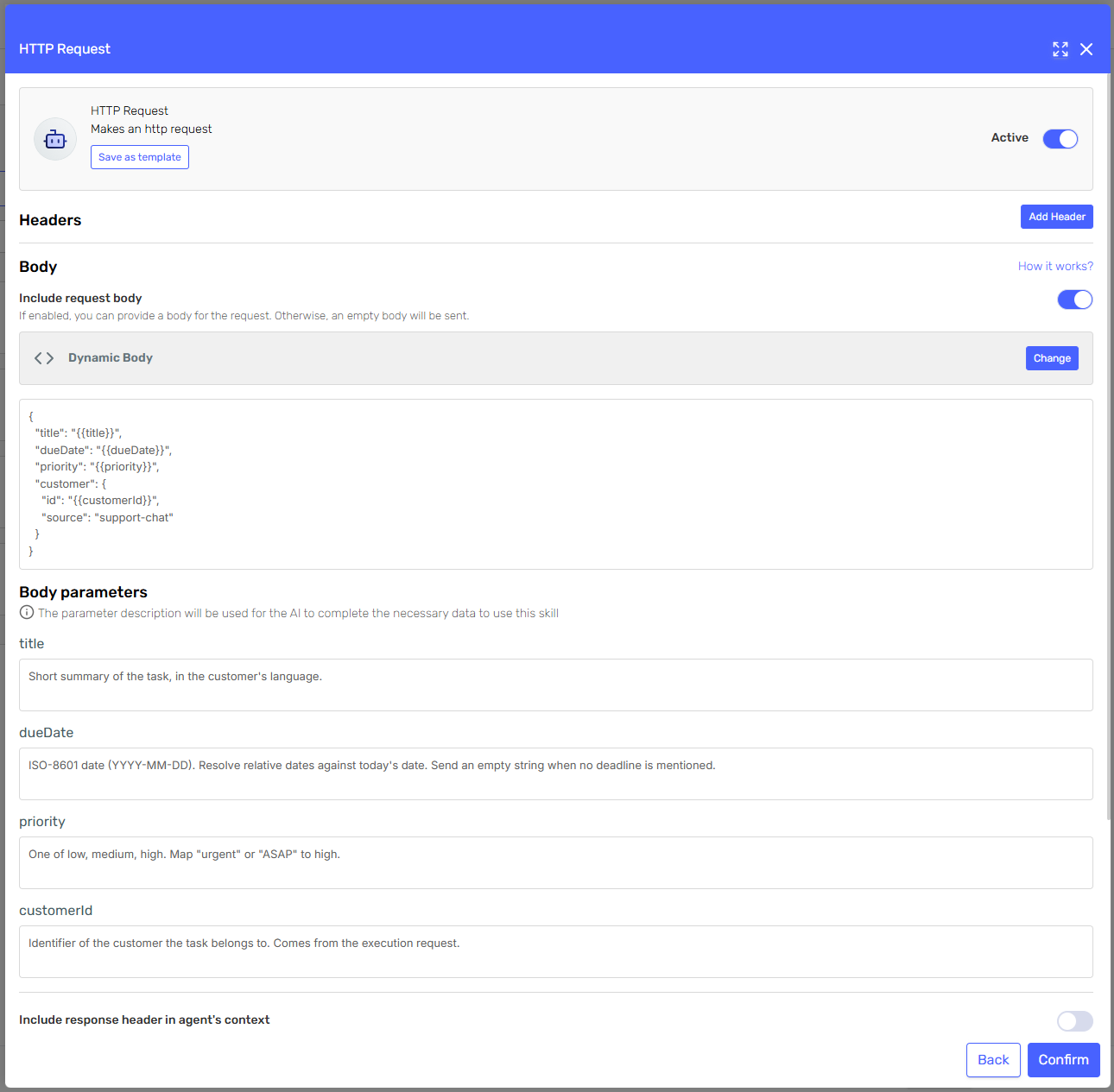
The improved description works, but in TaskCreate the agent is still writing the whole JSON document on every call. If the API is strict, or the payload is nested, it is safer to hand the agent a template and let it fill in the blanks. That is a Dynamic body:
{
  "title": "{{title}}",
  "dueDate": "{{dueDate}}",
  "priority": "{{priority}}",
  "customer": {
    "id": "{{customerId}}",
    "source": "support-chat"
  }
}
Each token is a parameter you declare with a name and a description, and nothing else: a skill parameter has no "required" switch and no default value, those belong to the agent's input parameters in the Agent Designer. The description carries all of the intent:
| Name | Description |
|---|---|
title | Short summary of the task, in the customer's language. |
dueDate | ISO-8601 date (YYYY-MM-DD). Resolve relative dates against today's date. Send an empty string when no deadline is mentioned. |
priority | One of low, medium, high. Map "urgent" or "ASAP" to high. |
customerId | Identifier of the customer the task belongs to. Comes from the execution request. |
Now the interesting part: customerId is also an agent input parameter. The support console already knows which customer is on the line and sends it with the execution request:
curl https://api.serenitystar.ai/api/v2/agent/YOUR_AGENT_CODE/execute \
  -H "Content-Type: application/json" \
  -H "X-API-KEY: YOUR_API_KEY" \
  -d '[
    { "Key": "message", "Value": "Log a task to chase the invoice, it is urgent." },
    { "Key": "customerId", "Value": "12345" }
  ]'
{{customerId}} is substituted from the request, before the model runs. {{title}}, {{dueDate}} and {{priority}} have no matching value in the context, so the agent completes them from their descriptions. Same syntax, two very different guarantees, which is exactly what you want: identifiers come from the caller, prose comes from the model.
The same idea on other content types
TaskCreate covered JSON. The remaining three skills differ in one place only: the content type, decided by the Content-Type header on the skill. When you do not set one the body is sent as application/json, which is why TaskCreate needed no header at all.
OauthToken: application/x-www-form-urlencoded
In OauthToken, add the header and remember that this body travels verbatim: there is no JSON-to-form conversion here, so the string the agent produces must already be the encoded pairs. Describe the fields and show the encoded shape:
Send these form fields:
- grant_type: always "client_credentials".
- scope (optional): the scopes the user asked for, separated by a plus sign.

Percent-encode any character that is not alphanumeric.

Example:
grant_type=client_credentials&scope=tasks.write
If you describe a JSON object here, the agent will dutifully produce JSON and the token endpoint will reject it. Where the field names are fixed and only the values vary, a Dynamic body such as grant_type=client_credentials&scope={{scope}} removes the risk altogether.
Documents: multipart/form-data
Documents is the exception, and the only content type built from JSON: describe a JSON object, and each property is turned into a form field before the request is sent. Put only the media type in the header, the boundary that separates the parts is generated and appended for you.
Send the document to register, with these fields:
- title (string, required): title of the document.
- category (string, required): one of "invoice", "contract", "report".
- notes (string, optional): empty string when the user gives no notes.
The keys become the field names, so they must match what the endpoint expects, casing included. Nested values are flattened rather than rejected: {"customer":{"id":"12"},"tags":["infra"]} arrives as the fields customer.id and tags[0], which is useful when an API expects that convention and surprising when it does not.
Incidents: text/plain
In Incidents the body is raw text, so the description must not talk about JSON at all:
Send plain text only, no JSON and no markdown. One line per incident, formatted as:
severity|component|one-sentence summary
Severity is one of P1, P2 or P3.

Example:
P2|checkout-api|Checkout returns 500 for guest users since 14:20 UTC.
For a fixed layout like this one, a Dynamic body with {{severity}}|{{component}}|{{summary}} is even safer: the separator can no longer go missing.
What we learned
- Describe, do not just illustrate. Types, required flags, enumerations and the "unknown value" case are what stop a body from being invalid.
- Put shape in a template, values in descriptions. A dynamic body removes a whole class of failures.
- Let the caller send what the caller knows, and the platform what the platform knows. Identifiers and tenants belong in input parameters, today's date is already there as
{{system.date}}. Neither belongs in the model's imagination. - Match the description to the content type. JSON for the JSON media types and for multipart; the already-encoded pair string for URL-encoded; raw text for plain text and XML.
- Read the execution logs. The request the skill actually sent is the fastest way to see whether the problem is your description or your API.