Inference REST API
Serenity Star's inference models can be invoked through OpenAI-compatible endpoints, so you can talk to them with the same request/response shapes and the same official OpenAI SDKs you already use for OpenAI.
These endpoints expose the models directly, not agents. There is no configured agent in front of the model, and no system prompt, instructions, knowledge, plugins, or other Serenity* Star configuration shaping the call. The response depends purely on the model you select and the request you send (your messages, tools, and parameters).
The endpoint looks up the matching model and vendor, validates your tenant's eligibility (balance, quota, permissions), runs the request, and records usage (token counts, timing, and cost).
There are two ways to reach a model, and both serve the Chat Completions and Responses OpenAI-compatible APIs:
| API | Endpoint | |
|---|---|---|
| Chat Completions | POST /api/v2/inference/chat/completions | |
| Responses | POST /api/v2/inference/responses | |
| Chat Completions | POST /api/v2/inference/{model}/chat/completions | Legacy |
| Responses | POST /api/v2/inference/{model}/responses | Legacy |
The endpoints marked as Legacy are still supported, but they are limited to a subset of SerenityCloud models and won't be updated with new models.
Both endpoints support:
- Streaming and non-streaming responses (
"stream": true/false). See Streaming for the event formats. - Client tools — standard OpenAI function calling, with the tool executed on your side.
- Input files — images and documents sent inline (base64 data URI) or by URL, forwarded natively to the model.
All examples use https://api.serenitystar.ai as the base URL and a placeholder YOUR_API_KEY.
Authenticate with your API key using either:
- the dedicated header —
X-API-KEY: YOUR_API_KEY, or - a bearer token —
Authorization: Bearer YOUR_API_KEY.
The API key (or user) must have at least one of the following roles:
- Tenant administrator
- Subtenant administrator
- AI Service Execution
Selecting the model
Unlike AIProxy, there is no agent in front of the model: each call goes straight to the model and is billed as a metered AI-service execution. There are two ways to choose which model runs.
Model in the body
The new endpoint receives the model in the body:
/api/v2/inference/chat/completions
/api/v2/inference/responses
Set the model, and when needed the vendor, in the standard OpenAI model field of the request body. This reaches any vendor with an active model configured in Serenity* Star (OpenAI, Azure, Anthropic, Google, Mistral, and so on).
The model value is parsed as:
vendor:model      → a specific vendor's model
model             → shorthand; the vendor defaults to SerenityCloud
// OpenAI
{ "model": "openai:gpt-5.6-sol" }

// A SerenityCloud model — vendor omitted
{ "model": "orion/pro-26.2" }

// Anthropic
{ "model": "anthropic:claude-sonnet-5" }
Model in the path (legacy)
The legacy endpoints select the model by the URL path instead of the body:
/api/v2/inference/{model}/chat/completions
/api/v2/inference/{model}/responses
{model} must be one of the following SerenityCloud models: qwen/qwen3.6, qwen/qwen3.6-35b-a3b, or qwen/qwen3.6-27b
OpenAI-compatible tools and SDKs
Because the endpoints speak the OpenAI protocol, any OpenAI-compatible SDK, library, or tool works without a Serenity-specific client — the official OpenAI SDKs, or an editor such as VS Code that accepts a custom OpenAI-compatible provider. You only need to:
- Set the base URL to
https://api.serenitystar.ai/api/v2/inference. The tool appends/chat/completionsor/responsesfor you. - Set the API key
- Choose the model in the standard
modelfield, using avendor:modelvalue (see Selecting the model).
from openai import OpenAI

client = OpenAI(
    base_url="https://api.serenitystar.ai/api/v2/inference",
    api_key="YOUR_API_KEY",
)

response = client.chat.completions.create(
    model="anthropic:claude-sonnet-5",
    messages=[{"role": "user", "content": "Hello!"}],
)
For step-by-step setups, see:
Playground
Prefer to experiment before writing any code? The Inference Playground in Serenity* Star lets you send requests, switch models, edit the request body to test different configurations, and inspect responses straight from the browser.
To open it, go to AI Services > Inference in the Serenity* Star hub.
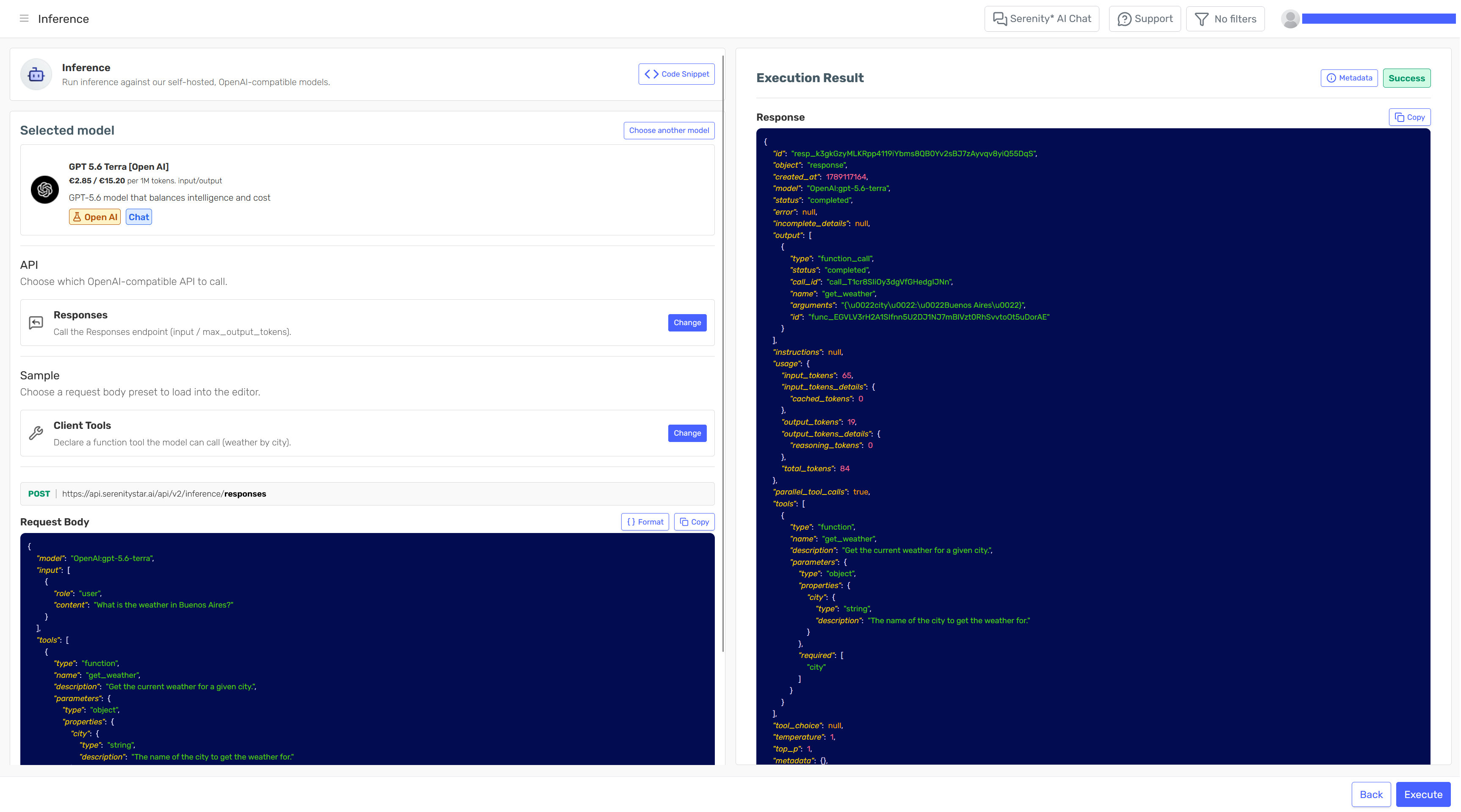
Chat Completions
POST /api/v2/inference/chat/completions or POST /api/v2/inference/{model}/chat/completions (legacy)
The examples below use the generic endpoint, with the model selected in the body's model field (with an optional vendor: prefix). To use a legacy per-model URL instead, add {model} to the path (see Model in the path).
Uses the OpenAI Chat Completions shape: a messages array, max_completion_tokens, stream, and an optional tools array.
Simple request
curl https://api.serenitystar.ai/api/v2/inference/chat/completions \
  -H "Content-Type: application/json" \
  -H "Authorization: Bearer YOUR_API_KEY" \
  -d '{
    "model": "orion/pro-26.2",
    "stream": false,
    "max_completion_tokens": 5000,
    "messages": [
        { "role": "user", "content": "Hello! Tell me a fun fact about Valencia." }
    ]
  }'
Set "stream": true to receive chat.completion.chunk events over SSE instead of a single response.
Tools
Client tools are standard OpenAI function calling: the model decides to call the function, you execute it on your side, and you send the result back for the model to complete its answer. In Chat Completions, tools use the nested function shape.
Step 1 — request that triggers the tool call.
curl https://api.serenitystar.ai/api/v2/inference/chat/completions \
  -H "Content-Type: application/json" \
  -H "X-API-KEY: YOUR_API_KEY" \
  -d '{
    "model": "orion/pro-26.2",
    "stream": false,
    "max_completion_tokens": 512,
    "messages": [
        { "role": "user", "content": "What is the weather like in Paris right now? Use the tool." }
    ],
    "tools": [
        {
            "type": "function",
            "function": {
                "name": "get_weather",
                "description": "Get the current weather for a given city",
                "parameters": {
                    "type": "object",
                    "properties": {
                        "city": { "type": "string", "description": "The city name" }
                    },
                    "required": ["city"]
                }
            }
        }
    ]
  }'
The response comes back with finish_reason: "tool_calls" and a tool_call carrying an id and the arguments:
{
    "choices": [
        {
            "finish_reason": "tool_calls",
            "message": {
                "role": "assistant",
                "tool_calls": [
                    {
                        "id": "call_abc123",
                        "type": "function",
                        "function": { "name": "get_weather", "arguments": "{\"city\":\"Paris\"}" }
                    }
                ]
            }
        }
    ]
}
Step 2 — run the function and send the result back. Append the assistant message (with the tool_calls) and a role: "tool" message whose tool_call_id matches the id from step 1.
curl https://api.serenitystar.ai/api/v2/inference/chat/completions \
  -H "Content-Type: application/json" \
  -H "X-API-KEY: YOUR_API_KEY" \
  -d '{
    "model": "orion/pro-26.2",
    "stream": false,
    "max_completion_tokens": 512,
    "messages": [
        { "role": "user", "content": "What is the weather like in Paris right now? Use the tool." },
        {
            "role": "assistant",
            "tool_calls": [
                {
                    "id": "call_abc123",
                    "type": "function",
                    "function": { "name": "get_weather", "arguments": "{\"city\":\"Paris\"}" }
                }
            ]
        },
        {
            "role": "tool",
            "tool_call_id": "call_abc123",
            "content": "{\"city\":\"Paris\",\"temperature_c\":18,\"condition\":\"light rain\",\"humidity\":72}"
        }
    ]
  }'
The final response contains the assistant answer that reflects the tool result.
You can also pin the model to a specific function with tool_choice:
"tool_choice": { "type": "function", "function": { "name": "get_weather" } }
The same flow works with "stream": true. In step 1 the tool call arrives via delta.tool_calls and the stream finishes with finish_reason: "tool_calls"; in step 2 the final answer streams as delta.content chunks.
Input files
Attach images and documents as content parts inside a user message's content array. Files can be inline base64 data URIs or remote URLs.
- Images use an
image_urlpart. - Documents use a
filepart with a nestedfile_dataand an optionalfilename.
curl https://api.serenitystar.ai/api/v2/inference/chat/completions \
  -H "Content-Type: application/json" \
  -H "Authorization: Bearer YOUR_API_KEY" \
  -d '{
    "model": "orion/pro-26.2",
    "stream": false,
    "max_completion_tokens": 5000,
    "messages": [
        {
            "role": "user",
            "content": [
                { "type": "text", "text": "Summarize the document and describe the image." },
                {
                    "type": "image_url",
                    "image_url": { "url": "data:image/png;base64,iVBORw0KGgo..." }
                },
                {
                    "type": "file",
                    "file": {
                        "filename": "report.pdf",
                        "file_data": "data:application/pdf;base64,JVBERi0xLjcK..."
                    }
                }
            ]
        }
    ]
  }'
A remote URL works the same way — use "image_url": { "url": "https://example.com/image.png" } for images, or point file_data at a URL for documents.
Files are forwarded natively to the model — they are not converted to Volatile Knowledge the way AIProxy processes them. Whether a given file type is understood therefore depends on the multimodal capabilities of the selected inference model. Audio files are not supported yet and are skipped. When a filename is omitted, one is synthesized from the MIME type.
Responses
POST /api/v2/inference/responses or POST /api/v2/inference/{model}/responses (legacy)
As with Chat Completions, the examples use the generic endpoint, with the model in the body's model field. To use a legacy per-model URL instead, add {model} to the path.
Uses the OpenAI Responses shape: an input array, max_output_tokens, stream, and an optional tools array. Note that in the Responses API tools are a flat array ({ "type": "function", "name", ... }) and the model returns a function_call output item.
Simple request
curl https://api.serenitystar.ai/api/v2/inference/responses \
  -H "Content-Type: application/json" \
  -H "Authorization: Bearer YOUR_API_KEY" \
  -d '{
    "model": "orion/pro-26.2",
    "stream": false,
    "max_output_tokens": 5000,
    "input": [
        { "role": "user", "content": "Hello! Tell me a fun fact about Valencia." }
    ]
  }'
Set "stream": true to receive typed Responses events over SSE. See Streaming for the event sequence.
Tools
Client tools follow OpenAI function calling for the Responses API. Tools are declared flat, and the model returns a function_call output item (with a call_id, name, and arguments).
Step 1 — request that triggers the function call.
curl https://api.serenitystar.ai/api/v2/inference/responses \
  -H "Content-Type: application/json" \
  -H "X-API-KEY: YOUR_API_KEY" \
  -d '{
    "model": "orion/pro-26.2",
    "stream": false,
    "max_output_tokens": 5000,
    "input": [
        { "role": "user", "content": "What is the weather like in Berlin right now? Use the tool." }
    ],
    "tools": [
        {
            "type": "function",
            "name": "get_weather",
            "description": "Get the current weather for a given city",
            "parameters": {
                "type": "object",
                "properties": {
                    "city": { "type": "string", "description": "The city name" }
                },
                "required": ["city"]
            }
        }
    ]
  }'
The response output contains a function_call item:
{
    "output": [
        {
            "type": "function_call",
            "call_id": "call_abc123",
            "name": "get_weather",
            "arguments": "{\"city\":\"Berlin\"}"
        }
    ]
}
Step 2 — run the function and send the result back. Replay the function_call in input, then append a function_call_output item with the same call_id.
curl https://api.serenitystar.ai/api/v2/inference/responses \
  -H "Content-Type: application/json" \
  -H "X-API-KEY: YOUR_API_KEY" \
  -d '{
    "model": "orion/pro-26.2",
    "stream": false,
    "max_output_tokens": 5000,
    "input": [
        { "role": "user", "content": "What is the weather like in Berlin right now? Use the tool." },
        {
            "type": "function_call",
            "call_id": "call_abc123",
            "name": "get_weather",
            "arguments": "{\"city\":\"Berlin\"}"
        },
        {
            "type": "function_call_output",
            "call_id": "call_abc123",
            "output": "{\"city\":\"Berlin\",\"temperature_c\":12,\"condition\":\"overcast\",\"humidity\":80}"
        }
    ],
    "tools": [
        {
            "type": "function",
            "name": "get_weather",
            "description": "Get the current weather for a given city",
            "parameters": {
                "type": "object",
                "properties": { "city": { "type": "string" } },
                "required": ["city"]
            }
        }
    ]
  }'
The final response contains the assistant message that reflects the tool result.
You can also pin the model to a specific function with tool_choice (Responses object form):
"tool_choice": { "type": "function", "name": "get_weather" }
With "stream": true, step 1 emits typed events (response.output_item.added for the function_call, response.function_call_arguments.delta, .done, response.output_item.done, response.completed); step 2 streams the final answer as response.output_text.delta events.
Input files
Attach images and documents as content parts inside an input message's content array, as inline base64 data URIs or remote URLs.
- Images use an
input_imagepart with animage_urlstring. - Documents use an
input_filepart with afile_datastring and an optionalfilename.
curl https://api.serenitystar.ai/api/v2/inference/responses \
  -H "Content-Type: application/json" \
  -H "Authorization: Bearer YOUR_API_KEY" \
  -d '{
    "model": "orion/pro-26.2",
    "stream": false,
    "max_output_tokens": 5000,
    "input": [
        {
            "role": "user",
            "content": [
                { "type": "input_text", "text": "Summarize the document and describe the image." },
                {
                    "type": "input_image",
                    "image_url": "data:image/png;base64,iVBORw0KGgo..."
                },
                {
                    "type": "input_file",
                    "filename": "report.pdf",
                    "file_data": "data:application/pdf;base64,JVBERi0xLjcK..."
                }
            ]
        }
    ]
  }'
A remote URL works the same way — set "image_url": "https://example.com/image.png" for images, or point file_data at a URL for documents.
Same as Chat Completions: files are forwarded natively to the model (so support depends on the model's multimodal capabilities), rather than being converted to Volatile Knowledge. Audio files are not supported yet and are skipped; a missing filename is synthesized from the MIME type.
Differences from AIProxy
If you are coming from the OpenAI Compatible AIProxy endpoints, note that inference talks to a raw self-hosted model rather than a configured agent:
- The model is chosen by a plain
vendor:modelvalue in the body'smodelfield (or by the URL path on the legacy per-model endpoints), not by a{agentCode}:{vendor}:{model}identifier — there is no agent code, because there is no agent. - Server tools are not available — there is no agent to run web search, image generation, speech generation, or workbench (code execution) on the server. Only client-side function calling is supported.
- No execution metadata — AIProxy accepts top-level
channel/user_identifier/group_identifierfields; inference does not. Inference executions are attributed to the API channel automatically. - Input files are forwarded natively to the model instead of becoming Volatile Knowledge.