Models & Providers
Overview
The Models & Providers tab in the Compliance Center lets you control which AI models and providers are available in Serenity* Star. The restriction needs the Models and Providers feature at the Advanced level in your plan.
What the restriction covers
The restriction is enforced on the server for:
- the main model of an agent;
- AI Services;
- embeddings;
- transcription;
- Image Generator.
What it does not cover yet
The restriction is not applied yet to every path that can send content to a provider. These paths can still reach a provider you have not allowed:
- Metacontrol guardrails;
- the fallback model of an agent;
- Web Search used as a subagent;
- Code Execution;
- the skill emulator;
- jobs that run in the background (scheduled jobs and the background queue).
If your organisation has to guarantee that content never reaches a given provider, do not rely on this setting alone for those paths. We will update this page when they are covered.
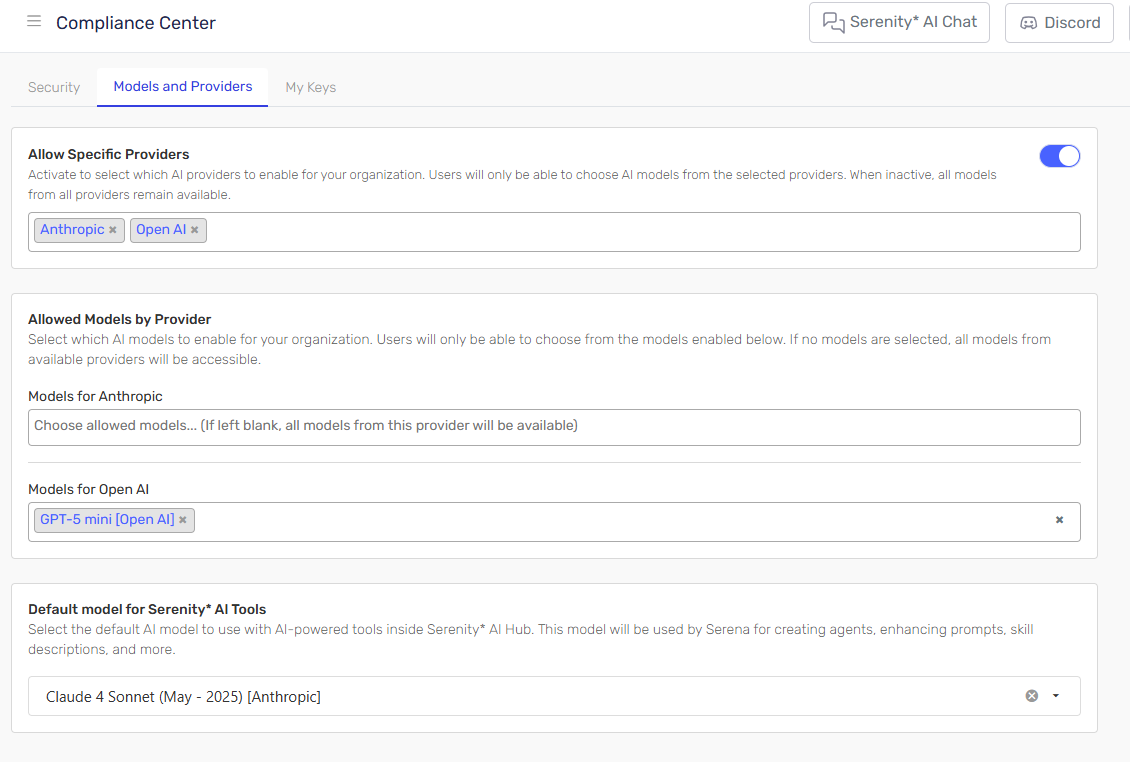
Provider Selection
Choose which providers are available for use. You can enable any number of providers. If no providers are selected, all models and providers will be available by default.
Model Selection by Provider
After selecting providers, you can specify which models are allowed for each provider. Only the selected models will be accessible.
Default Model for Serenity* AI Tools
Select the default AI model to use with AI-powered tools inside Serenity* Star. This model will be used by Serena for creating agents, enhancing prompts, skill descriptions, and more.
Tips
- Model selection affects Agents, Quality Studio, Insights, Serenity* AI Chat Management, Skills, and other features.
- Include at least one embedding model to support Knowledge Management features.
- Only agents using allowed model versions can be executed.